Overview
In this article, we will review the care report guidelines and overview.
Care Reporting Guidelines
Components denoted with an asterisk (*) are configurable. The configuration method (via user interface, file upload, or script) may vary, however. Some non-typical configuration efforts must be completed by Glennis Solutions.
Application | Menu* | Report Name | Description |
Care | Census | Daily Census - External | One of three available census reports. There is no financial information on the external report. The external census report should be provided to the state if they request a census report. |
Care | Census | Daily Census - Internal | One of three available census reports. The internal census report contains financial information. This census report is for internal use only. |
Care | Census | Daily Census - Ancillary Care | The Resident Ancillary Care report displays each resident currently assigned to an ancillary care in the community. Additionally, this report will display room, service, Ancillary Care, and Ancillary Care Rate. To Run this report, at least one community, Ancillary Care Series, and effective date is required |
Care | Resident Information | Resident Minutes Hours per Day | Provides the a 7-day average minutes/hours per day it takes to care for each resident. The total minutes/hours per day on this report reflects only the minutes in Glennis Care that are totaled from the assessments. It does not include any additional tasks provided to residents apart from the tasks identified on the assessment or any other community tasks that are performed by the staff. |
Care | Care Assessment & Profile | Resident Diagnosis | View each resident’s diagnosis by screen or view all residents who have the same diagnosis by sorting in Excel. |
Care | Care Assessment & Profile | Assessment Review | Provides a list of completed resident assessments between the start and end dates you select. It can be used as a month-end report to provide a listing of assessments completed during the month. |
Care | Resident Information | Resident Allergy | Provides a listing of resident drug, food and general allergies. For residents that do not have allergies for a given category, it will display as "No Known Allergies" or "NKA". |
Care | Resident Information | Resident Move Out by Reason | Details reasons former residents moved out of the community within a selected date range. This report can be used to identify move-out trends for a community. |
Care | Resident Information | Resident Contacts | View any or all contacts for a resident by screen or view all residents who have a mutual contact by sorting in Excel, such as a mutual doctor. |
Care | Care Assessment & Profile | Resident Wellness Tracker | Review any number of Wellness Tracker types for any or all residents. This report allows the RSD to see which Wellness Trackers have not been entered into Glennis Care. |
Care | Care Assessment & Profile | Resident Emergency Needs | Lists all residents and their specific needs during an emergency evacuation. This information must be completed upon move in and updated as needed. |
Care | Resident Information | Resident Diet | Summarizes the dietary needs of all residents. This information can be sorted by AL or LG. Review this report routinely with the DCS to ensure residents' diet needs are known by the Culinary team. |
Care | Assignments & Tasks | Weekly Task Time Variance | Review variances between the time (minutes) assessed to provide care and the actual minutes it took to provide the care, which is helpful in identifying trends. Information is pulled from both Glennis Care and Glennis Revenue. The report is updated for the week as task statuses are entered into Glennis Care. |
Care | Utilization Statistics | Review pending and past due items, and Glennis Care activity by community. NOTE: Communities should be utilizing all elements of Glennis Care except the Assessment and Assignments module, as communities offering only Independent Living services will not have activity in the Assessment and Assignments module. | |
Care | Resident Information | Resident Short Term Leave | Monitor active and/or closed STL statuses for residents by screen or in Excel. This is a good tool to ensure STLs have been closed appropriately. |
Care | Assessment Templates | Assessment Template Extract | |
Care | Resident Information | Resident Profile Report | Provides you with the complete face sheet for each resident and displays most of the pertinent information from the electronic resident record. |
Care | Resident Information | Resident Insurance Report | |
Care | Assignments & Tasks | Resident Scheduled Task | View scheduled tasks for an individual resident or a group of residents in a variety of ways. View the scheduled tasks for a group of services, all services scheduled or additional and/or assessed tasks. This report includes the time of day the tasks are scheduled and the day of the week. |
Care | Assignments & Tasks | Daily Provider by Resident | Review assignment sheets for individual residents. This report is useful if a resident’s tasks are going to be assigned to a resource role different than the room group that resource role is assigned to. This would apply if a resident has a temporary increase in services but is expected to return to their baseline, therefore it's not desired to change the room groups permanently. This will allow for a more evenly distributed the workload for the staff temporarily. |
Care | Assignments & Tasks | Resident Monthly Completed Tasks by Resident | |
Care | Assignments & Tasks | Daily Provider by Resource Role | Review an assignment sheet for a resource role or group of resource roles. Print daily and provide to your care resources as a task sheet for the day. |
Care | Resident Information | Resident DNR | Lists residents who have a DNR code status. Resident code status defaults to a full code. If a resident should have a DNR code status, it must be manually changed in the system after ensuring a copy of the properly executed DNR order is on hand. |
Care | Care Assessment & Profile | Assessment Comparison | |
Care | Care Assessment & Profile | Resident ADL | |
Care | Resident Information | Resident Notes | Review or print resident notes for a specified time frame. This report can be used if the state requests to review notes for specific residents for a specific time frame. Once the notes have been reviewed, they are to be shredded. |
Care | Care Assessment & Profile | Resident Preferences | Provides detailed resident preferences including, but not limited to, education information, family background, interests, dental and hearing. |
Care | Resident Information | Resident Vitals Report | Summarizes the vitals that have been tracked for a resident. |
Care Reports Overview
There are many reports available in the Care Management System, and users can access those reports in two days. To view an overview of all of the reports available, users can navigate to the Go To Menu.

From here, users can view a list of all the Care reports available, along with a description of the information available on that report. Selecting a report’s description will take users to that report’s form. Users can also access reports from the Reports tab on the header.
Assignments and Tasks
There are two reports that will allow users to view an assignment sheet:
- The Daily Provider Assignment by Resident and the Daily Provider Assignment by Resource Role.
- The Daily Provider Assignment by Resource Role report allows users to view and print a list of all assigned tasks for a selected resource role. This report could serve as a daily task sheet for care providers.
- The Daily Provider Assignment by Resident report displays assignment sheets for individual residents.
- The Resident Scheduled Tasks lets users view resident tasks for a selected group of residents, a selected service code, or a selected task type (assessed or additional).
- Finally, the Resident Monthly Task Completed by Resident report displays all of a resident’s tasks and shows the status of all of those tasks. This report can also be customized to include only certain residents or service codes, and the key at the bottom of the report explains the meaning of each task status.
The Resident Minutes/Hours Per Day report will display the average number of minutes/hours it takes to care for each resident, based on their assessed tasks. This report may help communities determine staffing needs.
Each of these reports can be viewed on screen, in PDF format, or exported to Excel.
Assessments
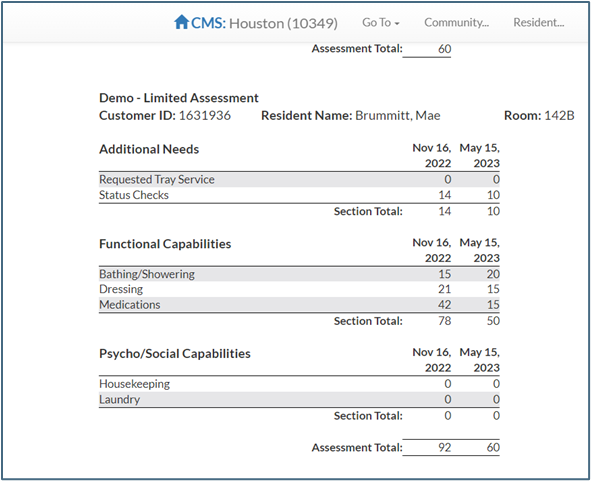
The Assessment Comparison Report offers a side-by-side comparison of a resident’s assessment results.
The Model Assessment provides printable copies of a community’s available assessments. The Assessment Review report provides a list of completed assessments for a selected date range. This report also lists upcoming assessment dates.
Resident Information
All of the information entered into Resident Care Services is available on reports. This includes Resident Allergy, Resident Diagnosis, Resident Code Status, Resident Diet, and Resident Insurance. Also available to print are Resident Contacts, Resident Move Out by Reason, Resident Vitals, and Resident Short Term Leave. Resident Notes will display notes for a specific time, in the event that the notes on a particular resident for a specific date range are required. Face sheets for two or more residents can be printed via the Resident Profile Report.
Incidents
Documentation regarding submitted incidents can be accessed through the incident dashboard in the Go to Menu.
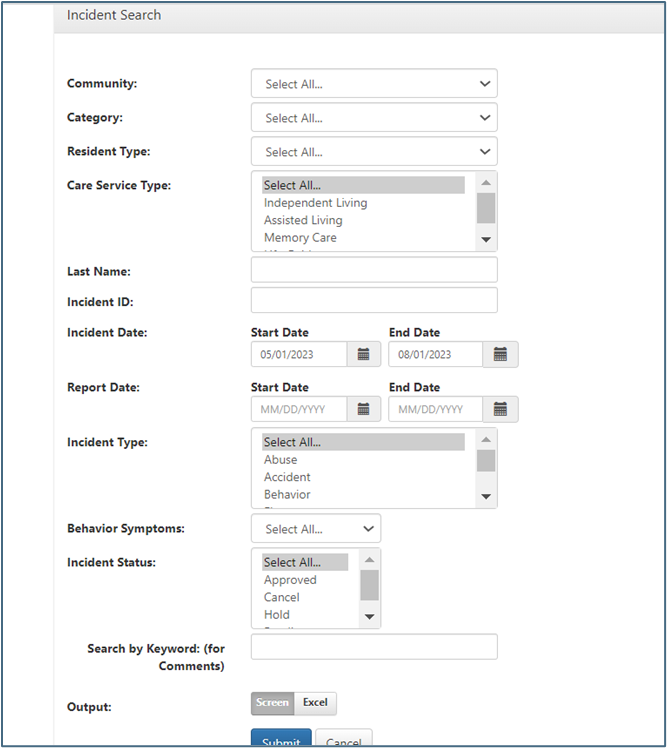
From the incident dashboard, selecting Incident Search will take users to a form that allows them to search for incidents based on a number of adjustable criteria. None of the search fields are mandatory; the search is customizable to whatever documentation is necessary. Users can view the data generated by the report on screen or in an Excel file.
Census Information
There are three types of census reports available.
The Daily Census- Ancillary Care
- Shows residents assigned to an ancillary care in the community.
The Daily Census – Internal
- Contains resident financial information and is for internal use only.
The Daily Census – External
- Does not contain financial information and should be provided to the state should they request a census report.
Was this article helpful?
That’s Great!
Thank you for your feedback
Sorry! We couldn't be helpful
Thank you for your feedback
Feedback sent
We appreciate your effort and will try to fix the article