Overview
In this article, we will review how to report an observed incident in the mobile care application.
Reporting an Observed Incident via Mobile Care Application
Step 1: Open the Mobile Care application by selecting the Mobile Care app logo on your device.

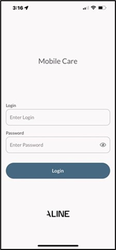
Step 2: When prompted, enter your login and password. Then, select the Login button.
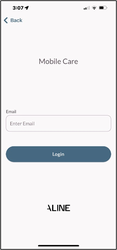
Step 3: If the Email validation screen displays, enter your email address and select the Login button.
Note: most users will not need to supply their email address upon login
Was this article helpful?
That’s Great!
Thank you for your feedback
Sorry! We couldn't be helpful
Thank you for your feedback
Feedback sent
We appreciate your effort and will try to fix the article