Overview
This article is to outline how a user can delete assessments via UI.
Step 1: Navigate to the resident's care profile
Step 2: Scroll to the Assessment Section
Step 3: Click the down carrot arrow
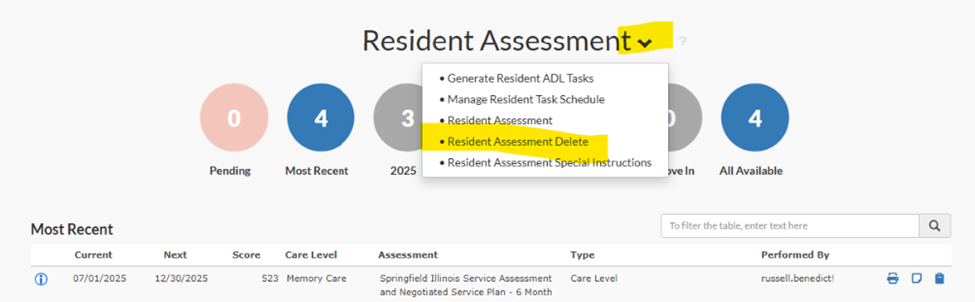
Step 4: Select Resident Assessment Delete
Step 5: Click Submit

Things to consider:
- Users will only be able to delete the most recent assessment.
- Does the user have access to delete?
- Assets 2110 and 3882
- Check the user's account in CMT to determine what access they have to care, such as, client super user, user, admin, etc. This will vary between tenants.
- If a user does not have access, determine what users have access to delete and refer the user to them. Typically, it may be the ED, Corporate Care users, BOMs, Resident Services Supervisor, etc. Check CMT > App Configuration to confirm.
Was this article helpful?
That’s Great!
Thank you for your feedback
Sorry! We couldn't be helpful
Thank you for your feedback
Feedback sent
We appreciate your effort and will try to fix the article