Overview
In this article, we will review how to submit an assessment
Submitting Assessment
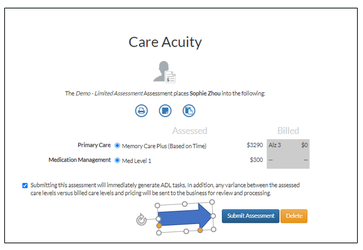
Once you have completed administering the assessment, scheduling tasks, and documenting everything you need you are ready to finish the process selecting the Submit Assessment button. Please note the following:
By submitting the assessment, it will immediately generate ADL tasks, in addition, any variance between the assessed care levels versus billed care levels and pricing will be sent to the business for review and processing.
Was this article helpful?
That’s Great!
Thank you for your feedback
Sorry! We couldn't be helpful
Thank you for your feedback
Feedback sent
We appreciate your effort and will try to fix the article