Overview
In this article, we will review how to change a residents next assessment date.
Video
Steps on Changing a Residents Next Assessment Date
Step 1: Choose a resident from the “Resident…” option located in the menu bar at the top of every page. This will redirect you to the resident’s profile page.

Step 2: From the resident’s profile page, click the dropdown arrow next to the resident’s name and select “Resident Assessment.”

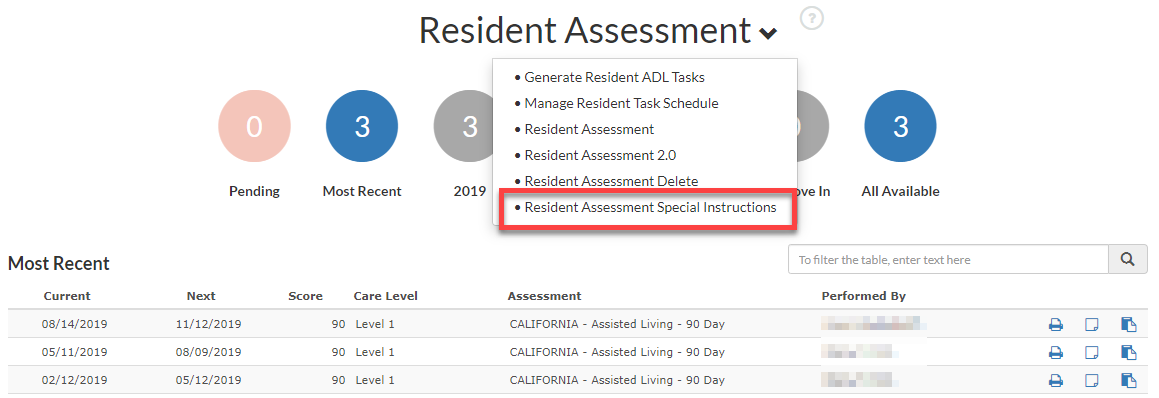
Step 3: From the Resident Assessment drop down, choose the Resident Assessment Special Instructions.
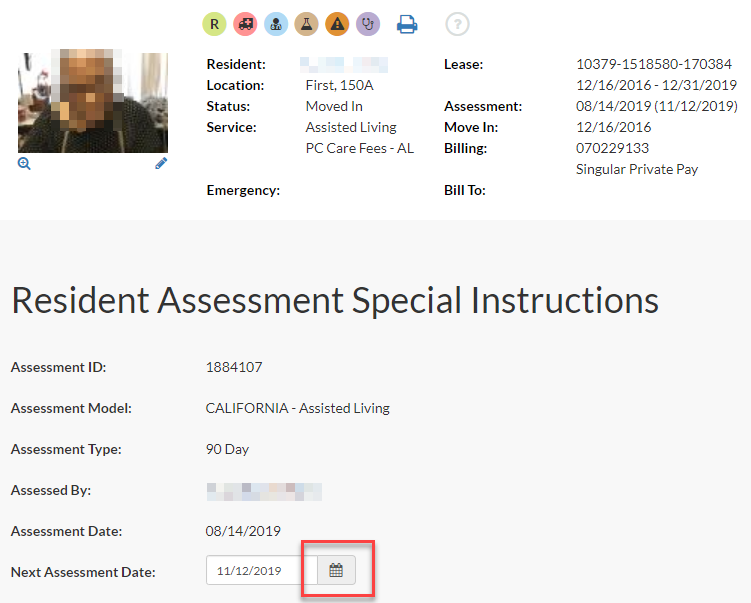
Step 4: Open the calendar and change the date to the appropriate next assessment date and click on Submit at the very bottom.

Was this article helpful?
That’s Great!
Thank you for your feedback
Sorry! We couldn't be helpful
Thank you for your feedback
Feedback sent
We appreciate your effort and will try to fix the article