Overview
In this article, we will review the frequently asked questions for Care Mobile.
Frequently Asked Questions
Community Employee Missing From Care Staff List
If an employee does not exist in the employee selection list, Community Care Leadership can add the employee to the app by using the Care Management System (CMS) application.
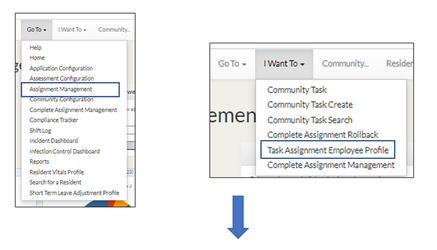
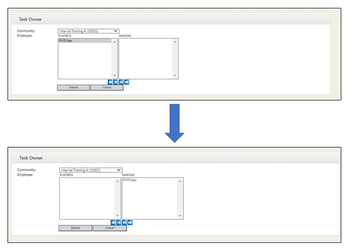
Step 1: Click Assignment Management in the Go To drop down and then click Task Assignment Employee Profile in the I Want To drop down. Select the employee to be added to the selection list, click on the arrow over , and click Submit.
Task Completed Out of Error
If a task was completed out of error, Community Care Leadership can “roll it back” and send it back to the mobile device.
Step 1: From CMS, click the Go To dropdown and click Complete Assignment Management.
Step 2: Click the I want to dropdown and select Complete Assignment Rollback.
Step 3: Search for the task that needs to be rolled back to the iPod.
Step 4: Select it and click submit at the top of the page. This will send it back to the iPods. The user will need to refresh their tasks to able to see it on their iPod. (Swipe down from the top of the task list or Log Out/back in)
Connectivity Issues
Due to a lack of Wi-Fi coverage, it is possible that tasks may not load in certain areas of your Community. The Care Mobile app can work offline if you have a location with strong Wi-Fi to initially “download” the tasks. Always load tasks before walking into areas of your Community with poor or no connectivity.
Load Resident Task Changes Mid-Shift
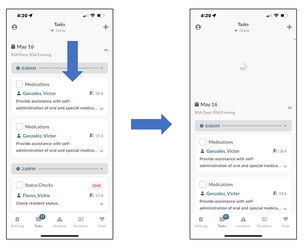
If a Resident care schedule change is made in CMS that results in a new or modified task, the task list can simply be refreshed while the device has connectivity (internet/Wi-Fi).
Step 1: Drag your finger down from the top of the task list screen to enable the pull to refresh option.
Step 2: Release your finger and the tasks will refresh.
Was this article helpful?
That’s Great!
Thank you for your feedback
Sorry! We couldn't be helpful
Thank you for your feedback
Feedback sent
We appreciate your effort and will try to fix the article