Overview
In this article, we will review documenting tasks.
Documenting Tasks
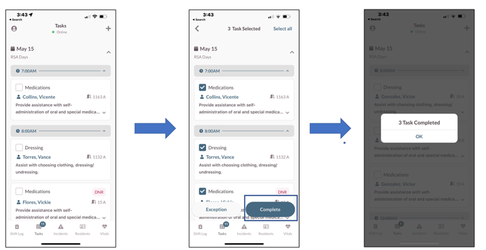
To mark tasks as completed, follow the steps below:
Step 1: Select the Check box next to each task you want to complete.
Step 2: Tap the Complete button.
Step 3: A validation screen with the number of tasks completed will display.
Note: If you are not configured as a Caregiver for your community, you will not see the Complete button. Only the exception button will be available.
Was this article helpful?
That’s Great!
Thank you for your feedback
Sorry! We couldn't be helpful
Thank you for your feedback
Feedback sent
We appreciate your effort and will try to fix the article