In this article, we will review compliance tracking in Aline Care.
What is a Compliance Tracker?
Aline Care’s Compliance Tracker is a way to ensure a community’s compliance with actions required for residents and/or employees. The actions could include vaccinations, routine testing, and other requirements that need to be tracked. This dashboard allows users an easy overview of a community’s progress toward full compliance with a requirement.
Completing a Compliance Tracker
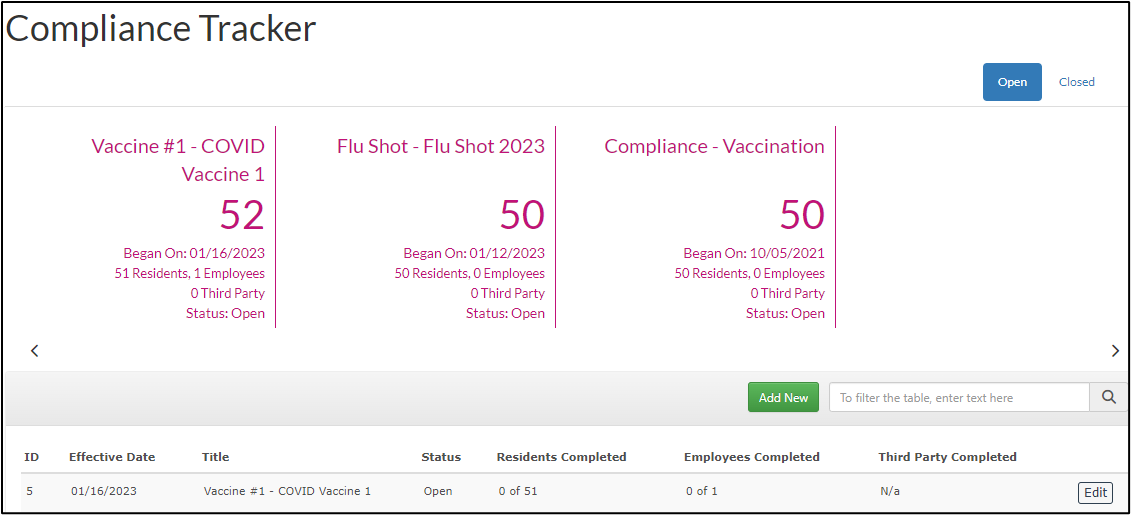
Open trackers that need to be completed will display on the top of the page. Select Edit to begin tracking resident and employee completion.
A list of employees, residents, or both will appear. To begin tracking, select the status drop down and make a selection from the status menu.
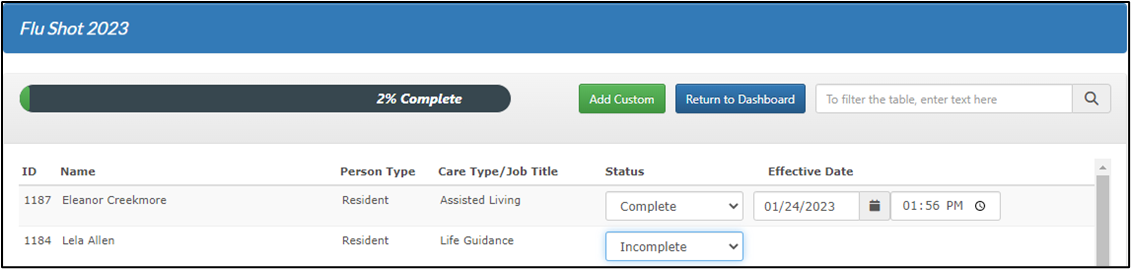
Selecting Complete defaults an effective date to the current one. Selecting the calendar icon allows users to edit the date. Users can also enter an effective time by selecting the clock icon.
Updates are automatically saved, and the progress bar is adjusted with each employee or resident status update.
Select Return to Dashboard to go back to the Compliance Tracker. The counts will be updated on the dashboard to reflect status updates.
Was this article helpful?
That’s Great!
Thank you for your feedback
Sorry! We couldn't be helpful
Thank you for your feedback
Feedback sent
We appreciate your effort and will try to fix the article