Overview
In this article, we will review marking shift log notes.
Mark Shift Log Notes
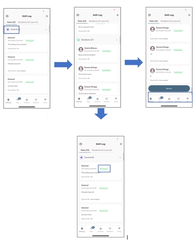
The following steps will walk you through the process of reviewing Shift Log notes. Once the notes have been reviewed, they will update from Submitted to Reviewed status.
Step 1: From The Shift Log screen, verify you have the notes tab selected
Step 2: Review notes under general (Expand if needed)
Step 3: Review Notes under Residents (Expand if needed)
Step 4: Scroll down to the bottom and select Review
Note: Items change from Submitted to Reviewed
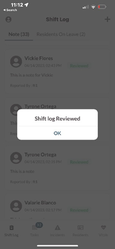
Step 5: Shift Log Reviewed verification will display.
Was this article helpful?
That’s Great!
Thank you for your feedback
Sorry! We couldn't be helpful
Thank you for your feedback
Feedback sent
We appreciate your effort and will try to fix the article