Overview
In this article, we will review adding a shift log note.
Adding a Shift Log Note
Step 1: Select the (+) Symbol
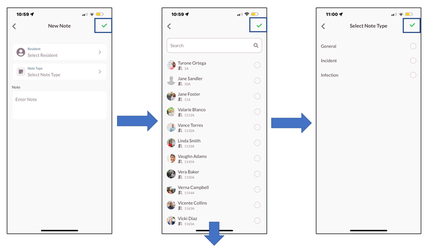
Step 2: From the New Note module Select Resident
Step 3: Select the Green Check ☑
Step 4: Select Note Type
Step 5: Select the Green Check ☑
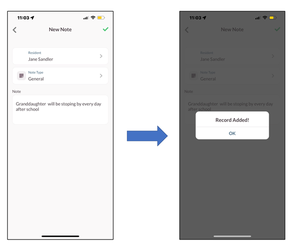
Step 6: Enter the Note
Step 7: Select the Green Check ☑
Step 8: Verify the ‘Record Added!’ verification is displayed on the screen.
Was this article helpful?
That’s Great!
Thank you for your feedback
Sorry! We couldn't be helpful
Thank you for your feedback
Feedback sent
We appreciate your effort and will try to fix the article