Overview
In this article, we will review logging out.
Logging Out
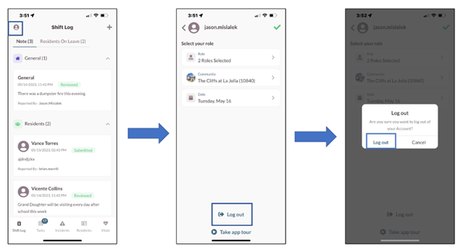
Whether ending a shift or changing devices, it is necessary to log out of the current device To log out of the application:
- Tap the User menu.
- Select Log out.
- Select Log out on the verification window.
Was this article helpful?
That’s Great!
Thank you for your feedback
Sorry! We couldn't be helpful
Thank you for your feedback
Feedback sent
We appreciate your effort and will try to fix the article