Overview
In this article, we will review pending transactions and offline capabilities.
Pending Transactions & Offline Capabilities
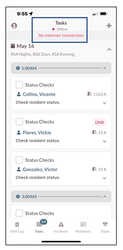
If your Care device loses internet connectivity (Wi-Fi), the app will go into offline mode. This is indicated at the top of the screen.
Step 1: A red dot next to Offline.
Step 2: No Internet Connection banner will display.
Step 3: Once you regain connectivity, any Tasks that were completed will be submitted automatically.
Was this article helpful?
That’s Great!
Thank you for your feedback
Sorry! We couldn't be helpful
Thank you for your feedback
Feedback sent
We appreciate your effort and will try to fix the article