Aline Care Release Announcement – Care Version 2.41
Available: As of April 2026
We’re excited to launch the ALINE Care 2.41 release, which introduces several all-new features – Bulk Records Requests, the ability to see recipient level eSign statuses on electronic documentation, and the ability to cancel future Resident Note Follow-Ups.
To learn more about Care Version 2.41 and the newly included features, please review the information below and feel free to contact your Aline CSM with any questions or concerns.
New Features and Enhancements
Introducing Bulk Record Requests
The new Bulk Records Request feature allows Aline Care users to run selected reports for selected residents for selected years. This new Bulk Records Request report can be found via Reports > Resident Information > Resident Yearly Report.
Reports included in the Resident Yearly Report:
- Incident
- Resident Assessment
- Resident Care Profile
- Resident Library
- Resident Notes
- Resident Profile
- Service Plan
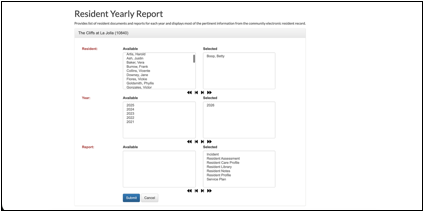
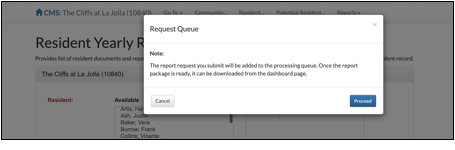
Generating the bulk records request, Resident Yearly Report, will enter the request queue and take a few moments to compile. Users may continue normal Aline Care operation while the report finalizes in the background.
Once the report has been submitted, users will find the report available on the Aline Care Dashboard within the Report Package Badge.
Report statuses will reflect the current state of the bulk records request. Pending reports are still compiling and reports with no data available will return a No Data status. Completed reports will display a Download button to download the report contents.
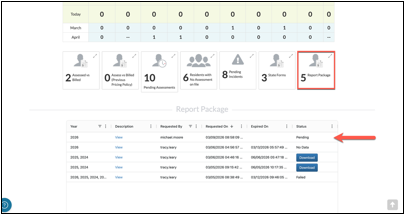
Selecting View displays the Report Package details, including included residents, included years, and included reports. Selecting Download will download the report to the user’s local device as a zip file that includes multiple PDF files. Each Resident Yearly Report will be a separate PDF within the zip file.
Recipient Level eSign Status
Note: this feature will only be utilized by organizations with eSign capabilities enabled.
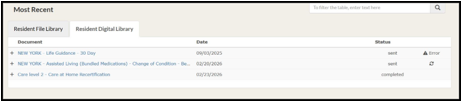
Once a resident assessment has been completed and the document(s) have been sent to the respective eSign signees, Aline Care users will have the ability to view the progress of the documentation signing.
To review recipient level eSign statuses, Aline Care users can navigate to the desired resident’s profile, select the Resident Digital Library under the Resident Library, and then expand the desired assessment to review the recipient level eSign status.
Canceling Resident Note Follow-Ups
Existing resident note follow-ups can now be removed when necessary, allowing for increased flexibility and ownership of clinical operation.
After a resident note has been submitted with required follow-up frequencies, dates, and times, future follow-ups can be deleted. To do so, Aline Care users can navigate to the resident notes section and select the edit icon. A button labeled Cancel Future Follow Up Notes will display.
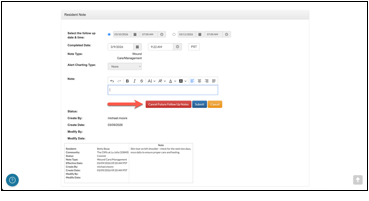
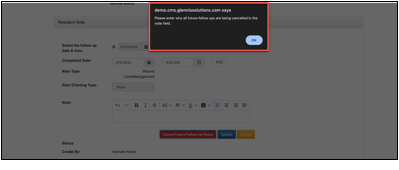
A pop-up will display requiring the user to use the Note section to document why all future follow-ups are being canceled. Aline Care users will enter this information into the Notes field and once again select Cancel Future Follow Up Notes.
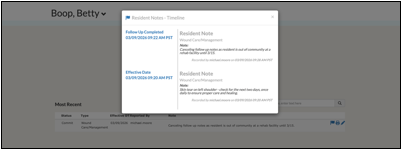
A Final acknowledgement will display. Once confirmed, the required Resident Note Follow-Ups will be deleted and the reasoning documented as part of the resident note.
Additional Key Changes
- Adaptive Follow-Up Scheduling: Aline Care adapts when Resident Note Follow-Up dates are scheduled before the creation date / time of the original note by generating replacement notes at the end in order to preserve the required count of follow-ups indicated in the original note.
- If Alert Charting Types are inactive, then inactive Alert Charting Types will no longer display while entering resident notes.
- Alert Charting Types can now be created with zero required follow-ups.
- Secondary Assessments can now be required before a Primary Assessment can be completed.
Was this article helpful?
That’s Great!
Thank you for your feedback
Sorry! We couldn't be helpful
Thank you for your feedback
Feedback sent
We appreciate your effort and will try to fix the article