Revenue Report Overview
The Revenue dashboard helps to optimize revenue management and track progress effectively.
Monitor move-ins, move-outs, rates, and trends, empowering efficient management across multiple communities.
All reports are on a standardized refresh schedule. Check Last Refresh date to know when the report was last updated.
Move-Ins and Outs (MTD)
• The Pending Move-Ins and Outs sheet provides a snapshot of the expected resident movement and its potential impact on revenue for the current month.
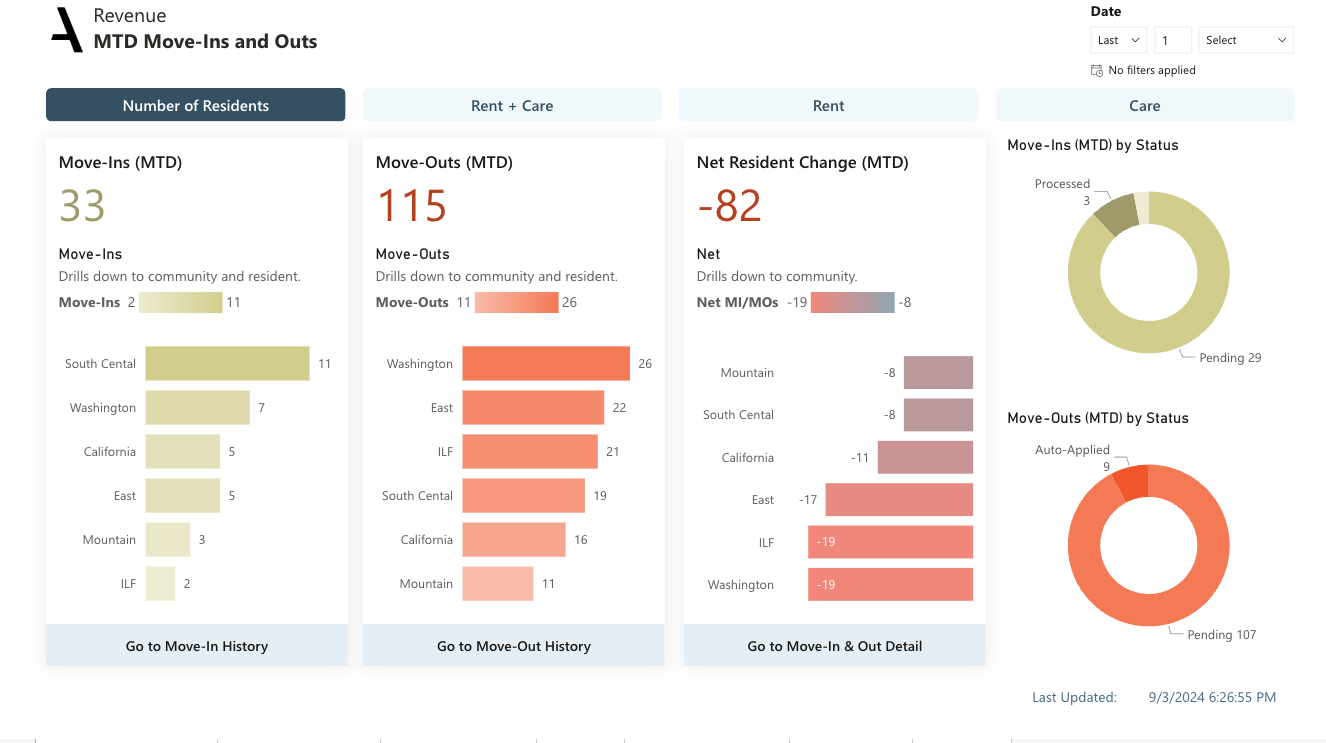
• Get ahead of potential revenue loss with data on scheduled and completed move-outs, including insights on community and resident-level impacts.
• Identify net resident changes and their potential revenue impact, providing valuable context for financial planning.
• Review move-in and move-out statuses via pie charts to understand the overall transition landscape within your communities.
• The buttons above the KPIs allow you to toggle the measure between number of residents, total revenue, care revenue, and rent revenue. Or, in the case of move-outs, revenue loss.
• Clicking the Go to Move-In History button takes you to the Move-In History view in the Move-In & Out History page.
• Clicking the Go to Move-Out History button takes you to the Move-Out History view in the Move-In & Out History page.
Dimensions:
Drill-down dimensions from Region to Community to Resident to Move In Status
Drill-down dimensions from Region to Community to Resident
Drill-down dimensions from Region to Community
Move-Ins and Outs (MTD) Metrics and their definitions:
• Move-Ins: The number of Resident Move-Ins for the current month, including those with reservations but are not yet moved in.
• Move-Outs: The total number of resident Move-Outs for the current month
• Revenue Gain: The total projected amount of revenue expected at Move-In for the current month
• Revenue Loss: The potential loss in revenue due to Move-Outs in the current month
• Net Resident Change: The net change in resident occupancy for the current month, determined by subtracting the total number of Move-Outs from the total number of Move-Ins
• Move-In Status: Move-In status indicates the current stage of a resident's Move-In process. 'Processed' Move-Ins have already taken place. 'Pending' Move-Ins are reserved for this month. 'Auto-Applied' Move-Ins are also reserved for this month and have been automatically updated in RMS
• Move-Out Status: Move-Out status refers to the current state of a resident's move-out process. 'Processed' indicates those who have already moved out. 'Pending' refers to those scheduled to move out this month and have given notice.'Auto-Applied' are also scheduled to move out this month and have been automatically updated in RMS
Move-In and Move-Out History
• The Move-In Information provides an evaluation of average move-in rates relative to the set room selling rates. It aids in identifying how well communities are performing against market rates.
• The Move-Out Information uncovers valuable insights into average move-out rates compared to move-in rates, enabling a more detailed revenue analysis
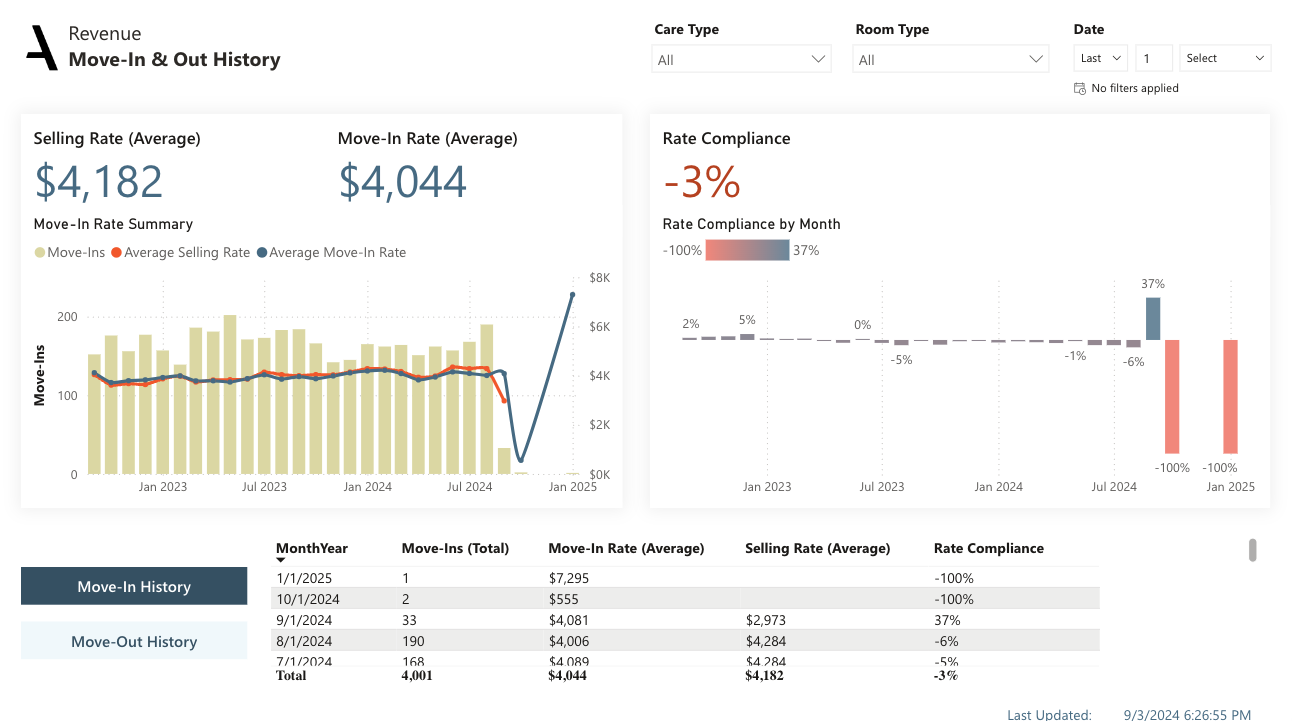
• Move-in and Move-Out History Buttons are used to switch between Move-In and Move-Out View on the same page.
• The "Move-In Rate Summary" chart presents a clear view of the number of move-ins, the average move-in rate, and the average selling rate over time, helping you easily track and compare these key metrics month over month.
• The Variance to Selling Rate reveals the percent difference between the average move-in rate and the selling rate over time. This data gives insights into how well the communities are meeting their market rate goals.
• The table delivers an organized view of the monthly number of move-ins, average move-in rate, average selling rate, and the average variance. This summary offers a quick and easy way to observe trends and compare metrics across different time periods
• Navigate through monthly move-out trends and compare them with the average move-in rates using the 'Move-Out Rate Summary' chart
• Monitor 'Replacement Rent', a vital performance metric that assesses the effectiveness of new move-ins in compensating for the revenue lost due to departures
• The table delivers an organized view of the monthly move-out counts, average move-in/out rates, and replacement rent percentage.
Move-In and Move-Out History Metrics and their definitions
• Move-Ins: The number of Resident Move-Ins for the current month, including those with reservations but not yet moved in.
• Average Move-In Rate: The average new revenue gained by a community from resident move-ins, including Respites and Second persons. It indicates the average rate at which residents are moving into the community and generating revenue. Calculated as the total Move-In rent rate divided by the number of resident Move-Ins
• Average Selling Rate: The average expected rate for rooms occupied by new residents, which can also be seen as the market rate. It takes into account rates for Second Person and Respite stays
• Rate Compliance: The percentage difference between the average Move-In rate and average selling rate, indicating how well communities are performing in terms of selling at the market rate
• Move-Outs: The total number of resident Move-Outs for the current month
• Average Move-Out Rate: the average rent revenue lost per move-out, including Second persons and Respites
• Replacement Rent: The percentage difference between the average rate at move-out and the average rate at move-in. An indicator of whether the revenue lost from move outs is being replaced by the revenue gained from move ins. This assesses the effectiveness of new move-ins in compensating for the rent revenue lost due to resident departures
Move-In and Out Details
• The Move-In and Out Details sheet provides an in-depth look into the move-ins and move-outs, along with their respective rent and care rates year-to-date.
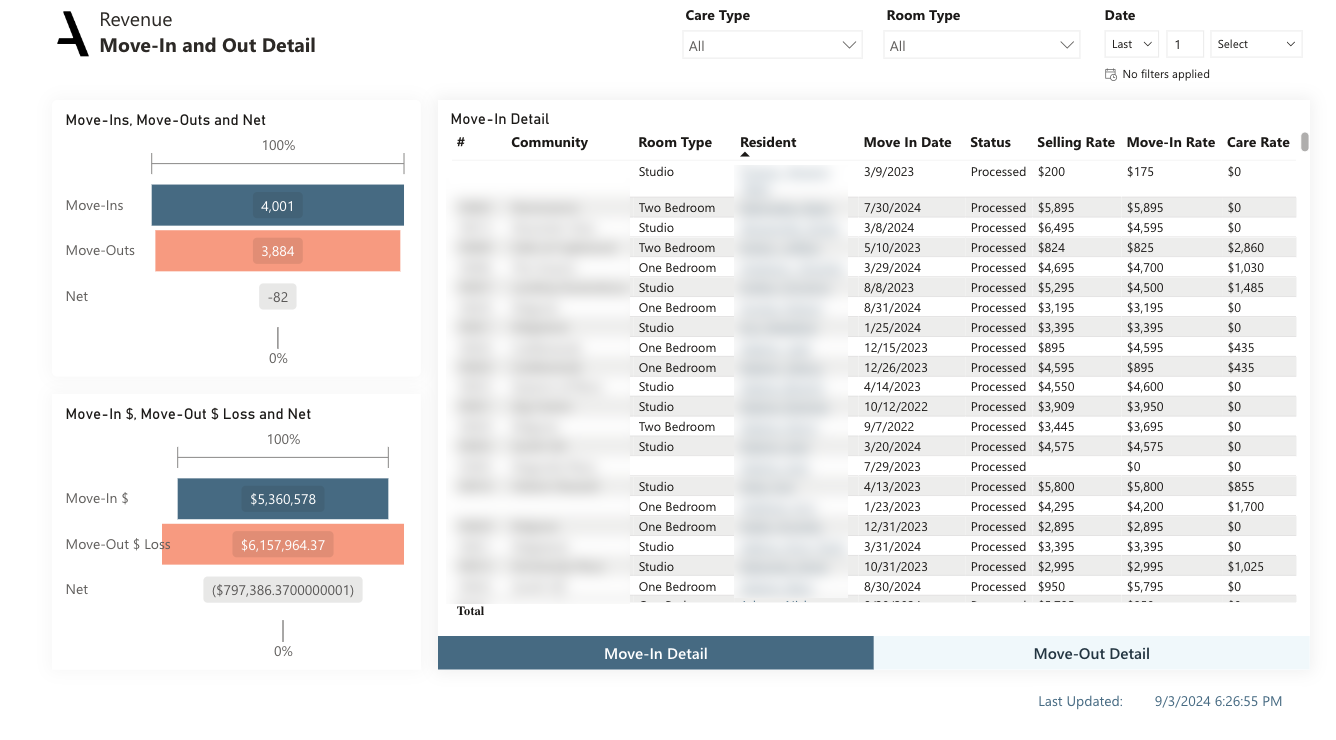
• Move-In Detail and Move-Out Detail Buttons are used to switch between Move-In and Move-Out Detail view on the same page.
• Visualize the net effect of move-ins and move-outs with charts depicting both the count of residents and the impact on rent revenue.
• Explore detailed tables showcasing individual move-in and move-out events, inclusive of community, room type, resident, date, and rates
• Uncover reasons for move-outs to better understand patterns and trends
Move-In and Move-Out Details Metrics and their definitions
• Move-Ins: The number of new residents that have moved into the community.
• Move-Outs: The number of residents that have moved out.
• Net: The net change in resident occupancy for the current month due to move-ins and move-outs, determined by subtracting the total number of move-ins from the total number of move-outs.
• Move-In $: The total revenue generated from new residents moving into the community. It represents the sum of the monthly rent that residents are paying as of their move-in date. This measure highlights the financial impact of new resident arrivals and provides insights into the revenue gained from move-ins.
• Move-Out $Loss: The total revenue loss resulting from residents moving out, representing the monthly rent that residents were paying at the time of their move-out.
• Net: The total net revenue from move ins and move outs. Sum of the rent the resident is paying per month as of the move in date minus the sum of the rent revenue the resident is paying per month at the time of move out.
• Move-In Status: Move-In status indicates the current stage of a resident's Move-In process. 'Processed' Move-Ins have already taken place. 'Pending' Move-Ins are reserved for this month.'Auto-Applied' Move-Ins are also reserved for this month and have been automatically updated in RMS.
• Move-Out Status: Move-Out status refers to the current state of a resident's move-out process. 'Processed' indicates those who have already moved out. 'Pending' refers to those scheduled to move out this month and have given notice. 'Auto-Applied' are also scheduled to move out this month and have been automatically updated in RMS.
Rent Roll
• The Rent Roll sheet provides an encompassing view of the current rent and selling rates across all communities.
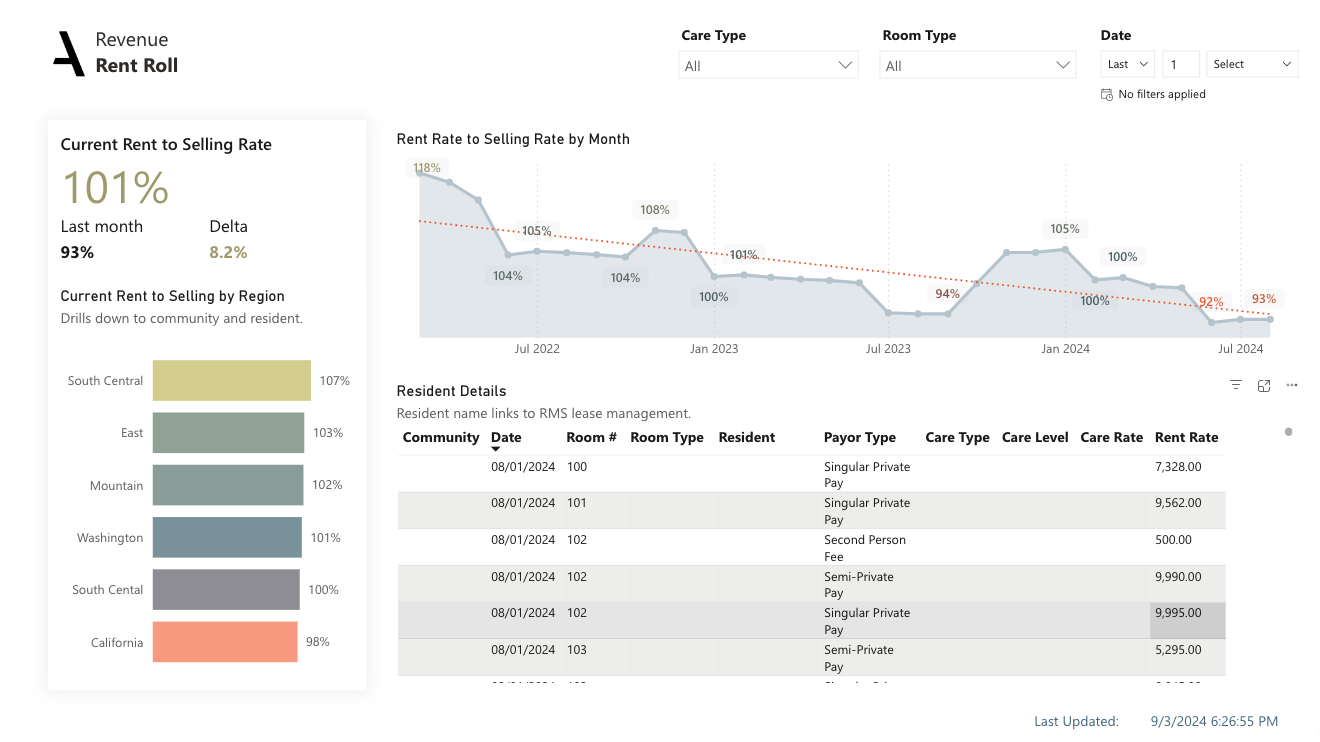
• KPI highlights the variance between current rent and selling rates, shedding light on financial performance relative to market rates.
• Utilize the bar chart to compare Current Rent to Selling Rate at the region and community level.
• Track the evolution of Rent Rate to Selling Rate over time with the line chart.
• Access details of the current rent roll through a detailed table, with fields spanning community, room and resident
specifics, rates, and key dates.
Dimensions:
Drill-down dimensions from Region to Community to Resident
Rent Roll Metrics and their definitions
• Current Rent to Selling Rate: The variance between the current rent and the selling (market) rate, accounting for the different rates for different payor types.
• Rent to Selling Rate: The variance between the historical rent and the selling rate, taking into consideration different payor types. It is calculated using a cumulative approach, which includes the rent at the beginning of each previous month up to the present day of the current month. The cumulative rent is divided by the sum of the corresponding selling rates.
Assessed vs. Billed Care
• The Move-In and Out Details sheet provides an in-depth look into the move-ins and move-outs, along with their respective rent and care rates year-to-date.
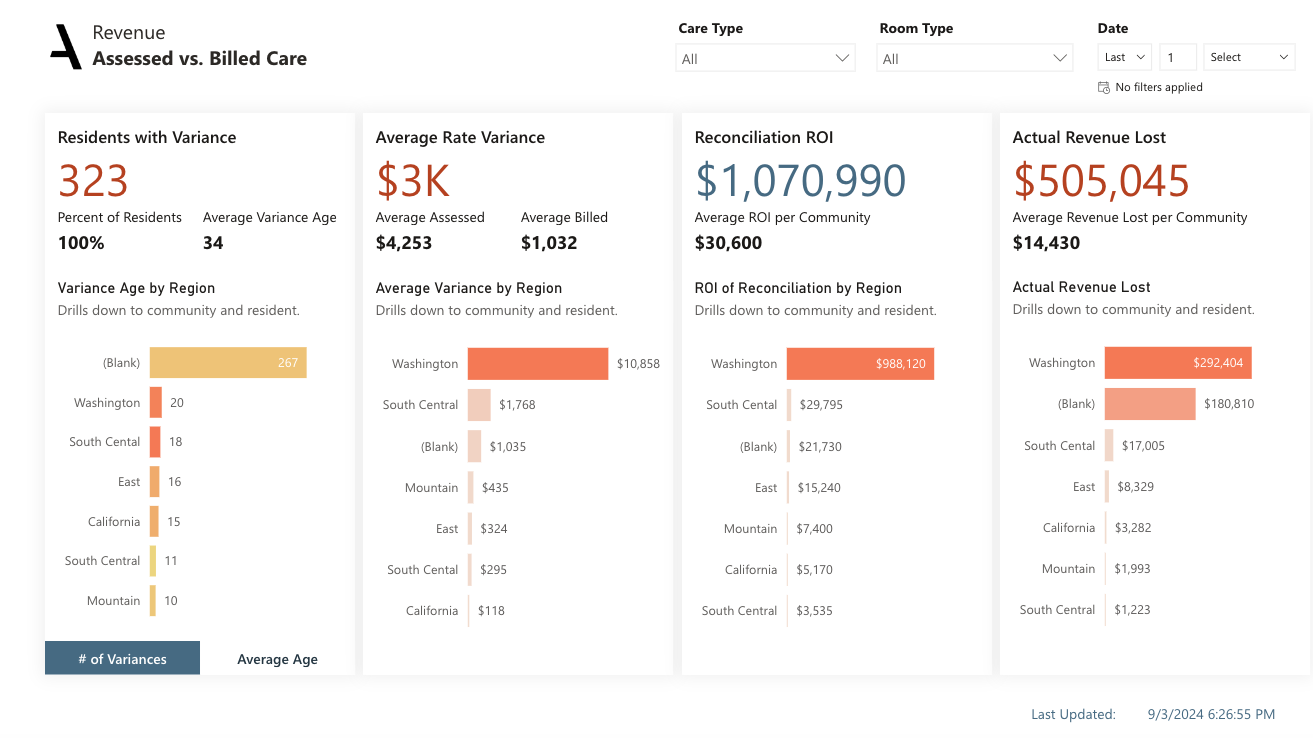
• The KPls on the top left show the number and percentage of residents with variances, along with the average age of these variances. A complementary bar chart breaks down the number of residents with variances by community
• The next section to the right provides insight into the average dollar variance per resident, with a bar chart showcasing total assessed and billed rates at a community level
• The sheet concludes with an assessment of potential revenue recovery, indicated by the ROl of Reconciliation KPI and Active Variance Revenue Loss indicators. It highlights communities where rectifying discrepancies could have a significant impact.
Dimensions:
Drill-down dimensions from Region to Community to Resident
Assessed vs Billed Care Metrics and their definitions
• Residents with Variance: The number of residents with a discrepancy between the assessed and billed amounts
• Percent of Residents: The percentage of residents with a discrepancy between the assessed and billed amounts
• Average Variance Age: The average length of time an assessed versus billed variance has existed, indicating the average duration of a discrepancy in potential revenue
• Reconciliation ROl: The potential monthly revenue that could be gained by rectifying assessed versus billed discrepancies
• Actual Revenue Lost: The total revenue lost so far for unresolved discrepancies between assessed and billed amounts
• Average variance per resident: The average variance per resident between the assessed and billed amounts. This can indicate the severity of discrepancies
Revenue Trends
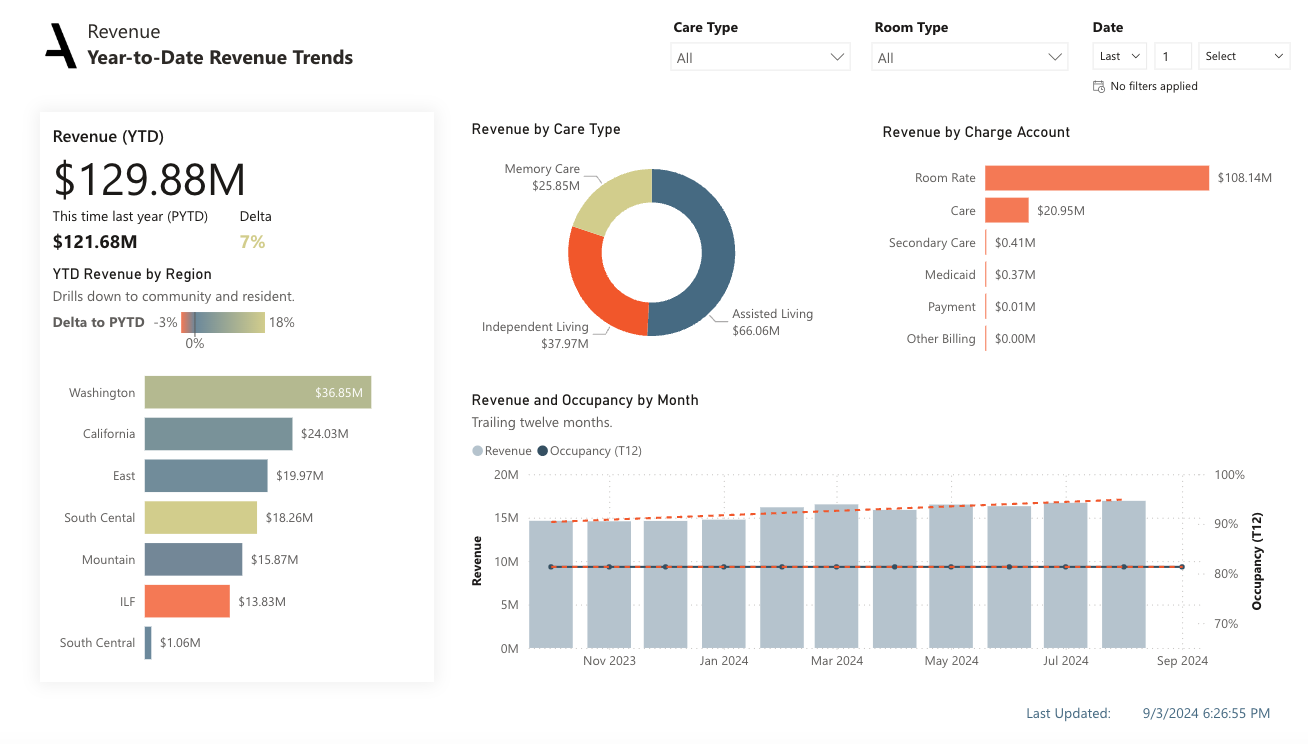
• The Revenue Trends sheet offers a comprehensive view of year-to-date revenue across different parameters including building, care type, and revenue type.
Filters: Filters applied for the Report level. Click on the filter pane to expand it and see more filter options
Slicers: Care type and Room type were introduced to the Slicer visual to filter the necessary.
Date Filter: Day, Week, Month and Year values can be filtered for the present, past and future dates.
• An initial bar chart provides a breakdown of revenue by region, community and resident, allowing for easy comparison and spotting outliers.
• A pie chart presents an overview of revenue by care type, providing insight into the most revenue-generating services
• The sheet further dissects revenue by charge account, such as room rate, care, other billing, and secondary care, using a bar chart
• A combo chart showcases the trend of revenue and occupancy over time, providing a visual representation of their
relationship and impact
Dimensions:
Drill-down dimensions from Region to Community to Resident
Revenue Trend Metrics and their definitions
• Total Revenue: The total amount of revenue generated
• Occupancy: Occupied units divided by total units
Was this article helpful?
That’s Great!
Thank you for your feedback
Sorry! We couldn't be helpful
Thank you for your feedback
Feedback sent
We appreciate your effort and will try to fix the article