Overview
In this article, we will review how to create ad hoc tasks.
Creating Ad Hoc Tasks
To document additional tasks that occur outside of the scheduled tasks, an Ad Hoc Task can be entered using the following steps.
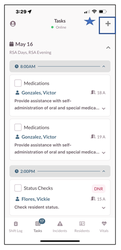
Step 1: From the Tasks screen, tap the + Symbol in the top right hand corner.
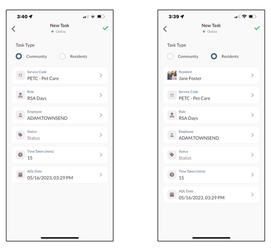
Step 2: Select the Task Type.
Step 3: Select Community or Resident
Note: Only Difference is selecting a resident
Step 4: Fill in all required Fields.
Step 5: Select the Green Check Mark.
Was this article helpful?
That’s Great!
Thank you for your feedback
Sorry! We couldn't be helpful
Thank you for your feedback
Feedback sent
We appreciate your effort and will try to fix the article