Overview
In this article, we will be reviewing the main care application after an incident is submitted.
Reviewing Observed Incident
The following actions can be completed in the Observed Incident Queue:
- Save an Observable Incident as an Incident.
- Save an Observable Incident as a Care Note, not an Incident.
- Delete an Observable Incident that is not relevant or created in error.
- From the Glennis Intranet Home Page, select Waiting for Approval under My Approvals.

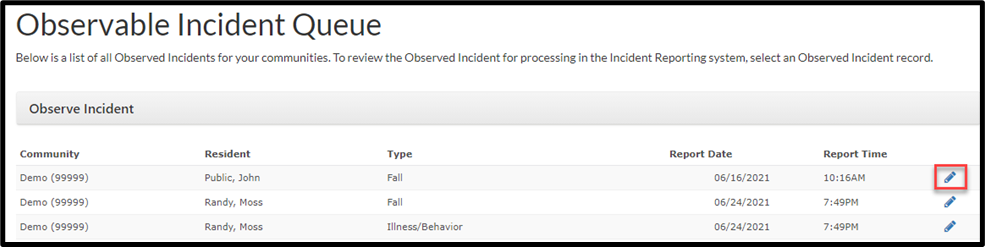
Step 1: View the Observed Incident queue.
Step 2: Select the pencil icon to view an Observable Incident.
Review the Observed Incident information. Scroll to the bottom of the page to manage the Observed Incident.
- Save as Incident: Escalate the submission to an Incident.
- Save as Note: Save the submission as a Care Note.
- Cancel: Cancel the submission but a record will be kept.
- Delete: Delete the submission and remove the record.

Was this article helpful?
That’s Great!
Thank you for your feedback
Sorry! We couldn't be helpful
Thank you for your feedback
Feedback sent
We appreciate your effort and will try to fix the article