Overview
The Incidents App provides actionable insights on incident indicators, patterns, and high incident communities. Analyze trends and optimize responses based on resident histories and KPI tracking to enhance care and decision making.
Note: the reports are all on a standardized refresh schedule. Check the Last Refresh date to know when the report was last updated.
Incidents Overview Report
The incident overview report offers a quick snapshot of incident management - including data like incidents (MTD), average incidents per week, incidents by week over time, incidents by indicator, and incidents by outcome.
Data can also be exported, filtered, and drilled down.
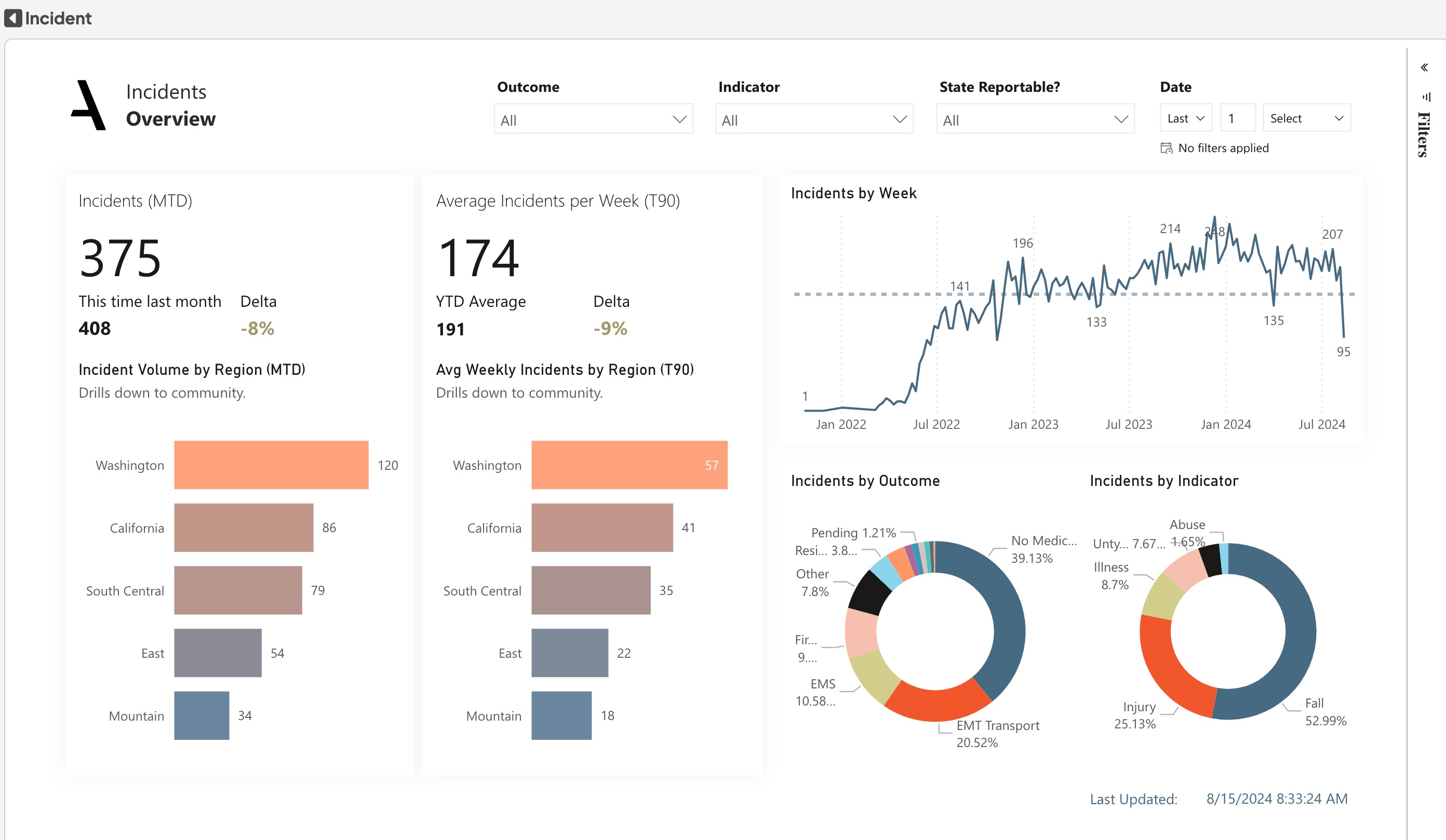
Get a clear understanding of the current state of incident management with at-a-glance KPIs. The distribution of incidents over the past 30 days is displayed in a bar chart that drills down from the region level to the community level. The distribution of average Incidents over the past 90 days is displayed in a bar chart that drills down from the region level to the community level.
Look at a trend chart of incidents over time to identify any patterns or recent changes broken down by week and day. In the pie charts, discover insights about common Incident types and outcomes.
Dimensions:
- Drills down from Region to Community
- Drills down from week to date
Incidents: The number of Incidents that occurred in the last 30 days
Average Incidents per week (T90): The average number of Incidents experienced by each resident in the last 90 days
Incident Analysis Report
The analysis sheet offers valuable insights into incidents and their operators at the community level. Dig into the data for highest incident traffic days, highest incident traffic hours, after average hours to report incidents, and residents with frequent incidents (T30).
Data can also be exported, filtered, and drilled down.

The distribution of incidents over the past 30 days is displayed in a bar chart that drills down from the region level to the community level. A bar chart that displays the number of residents who have experienced more than two incidents in the past 90 days is broken down by region, community, and individual level.
The days and hours with the most traffic incidents for the last 90 days are shown on the line graph.There is a toggle to switch between the Region and Incident
Dimensions:
- Drills down from Region to Community
- Drills down from Region to Community to Resident
Average Hours to Report (T30): The number of Incidents that occurred in the last 30 days
Residents with 3+ Incidents (T90): The number of residents who has more than 2 Incidents occurred in the last 90 days.
Incident Details Report
The details sheet helps in conducting in-depth incident analysis and generating accurate reports as needed. Filter incident details by incident type, outcome, date ranges, and more!
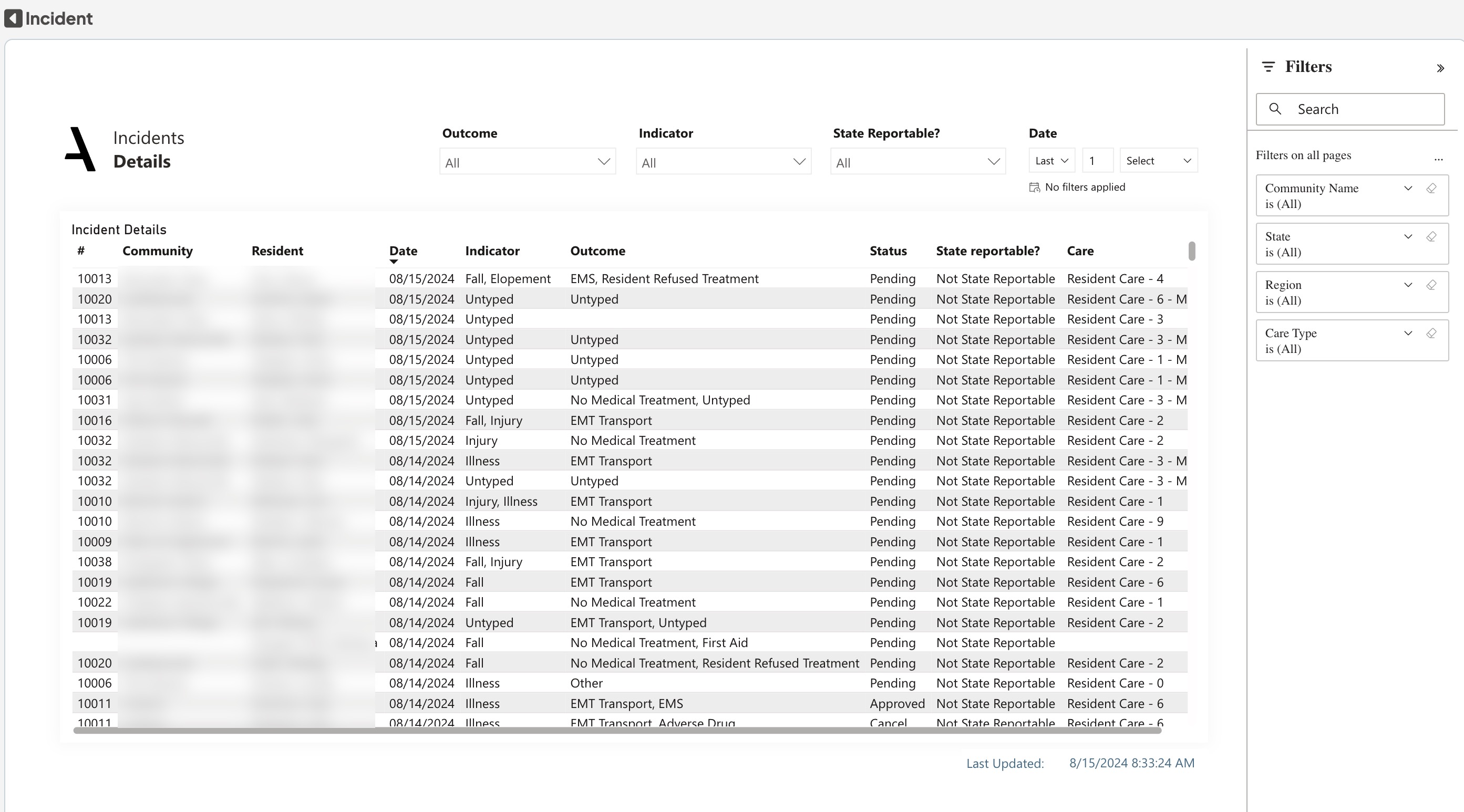
Use the Details table to access the information about each resident and incident. The table includes Community Number, Community Name, Resident Name, Date, Indicator, Outcome, Status, State Reportable, and Care Level.
Was this article helpful?
That’s Great!
Thank you for your feedback
Sorry! We couldn't be helpful
Thank you for your feedback
Feedback sent
We appreciate your effort and will try to fix the article