Overview
Delve into historical sales metrics, including inquiry volumes and conversions, to understand trends and guide strategic adjustments. The Sales Trends app also provides insights into "Not Qualified" and "Lost to Competitor" inquiries to fine-tune future strategies.
Note: the reports are all on a standardized refresh schedule. Check the Last Refresh date to know when the report was last updated.
Metrics Report
The Metrics Sheet provides a detailed look at your sales metrics, breaking them down by community and month over the past three years.
Data can also be exported, filtered, and drilled down. 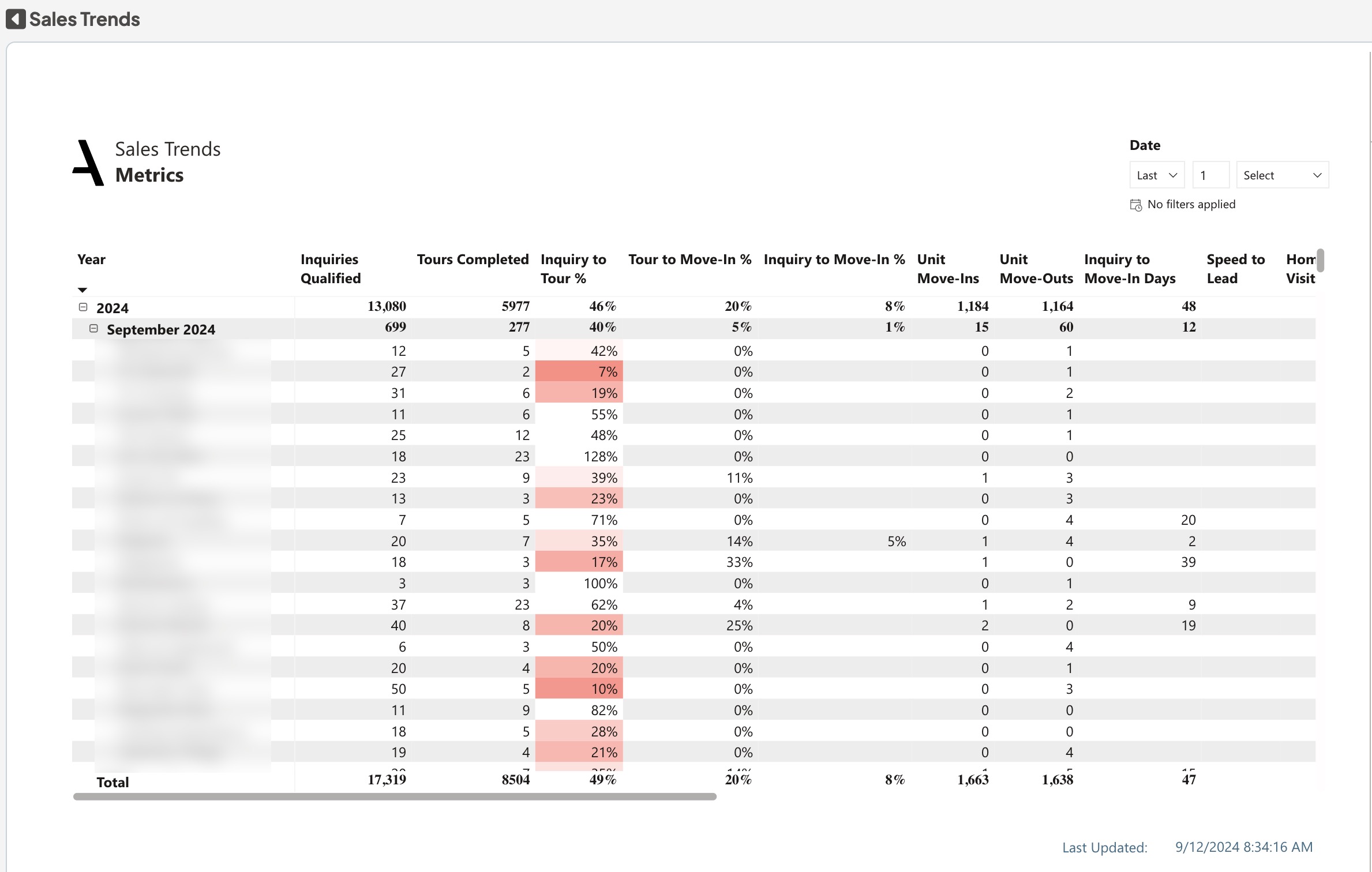
Sales Volume and Effectiveness: View data on Inquiries Qualified, Tours Completed and Inquiry to Tour % for each community to better understand your sales activities. Sales Pipeline Efficiency: Look into metrics like Inquiry to Move-in days and Speed to Lead to evaluate how quickly your sales process is moving. Community Health: Metrics such as Unit Move-Ins, Unit Move-Outs and Average Move-In Rate help you to gauge the health of your community occupancy.
Sales Performance: Review sales activities including Inquiries at Risk, Inquiries Missing Next Step, and Past Due Activities for an overall assessment of your sales efforts. Color-Coding: Check the color-coded "New Inquiry to Tour %" used to quickly see if you're meeting the goals of 45% and 25%, respectively. Date Range: Apply the date range filter to focus on data for specific periods, making your analysis more targeted.
Metrics Overview metrics and their definitions:
Inquiries Qualified: The number of inquiries that were not unable to qualify or Not qualified
Tours Completed: The total number of completed tours
Inquiry to Tour%: The percentage of qualified inquiries that led to a tour
Tour to Move-In%: The percentage of tours that resulted in a unit move-in
Inquiry to Move-In%: The percentage of new, qualified inquiries that resulted in a unit Move-In
Unit Move-Ins: The number of unit move-ins. A couple moving into one apartment is counted as a single unit move-in
Unit Move-Outs: The number of unit move-outs
Inquiry to Move In Days: The number of days between the initial inquiry and the move-in date
Speed to Lead: The average time from the creation of an eLead to the first contact. This excludes inquiries that are not qualified and inquiries created between 8:00 PM and 7:59 AM local time
Home Visits: The total number of completed home visit, Hospital/Rehab visit
Average Move-In Rate: The average move in rate, only when the payor type is Singular Private Pay
Total Activities: The number of journal activities marked as complete
Inquiries at Risk: Hot, Closing and Reserved Inquiries that have not been contacted in 7 days (AL/MC), 14 days (IL), or 21 days(Reserved at unoccupied new developments,) as well as New Leads older than 14 days
Trend Analysis Report
The Trend Analysis Sheet provides a comprehensive view of your customer journey, delivering actionable insights across multiple metrics like Inquiries, Tours, and Move-Ins.
Data can also be exported, filtered, and drilled down.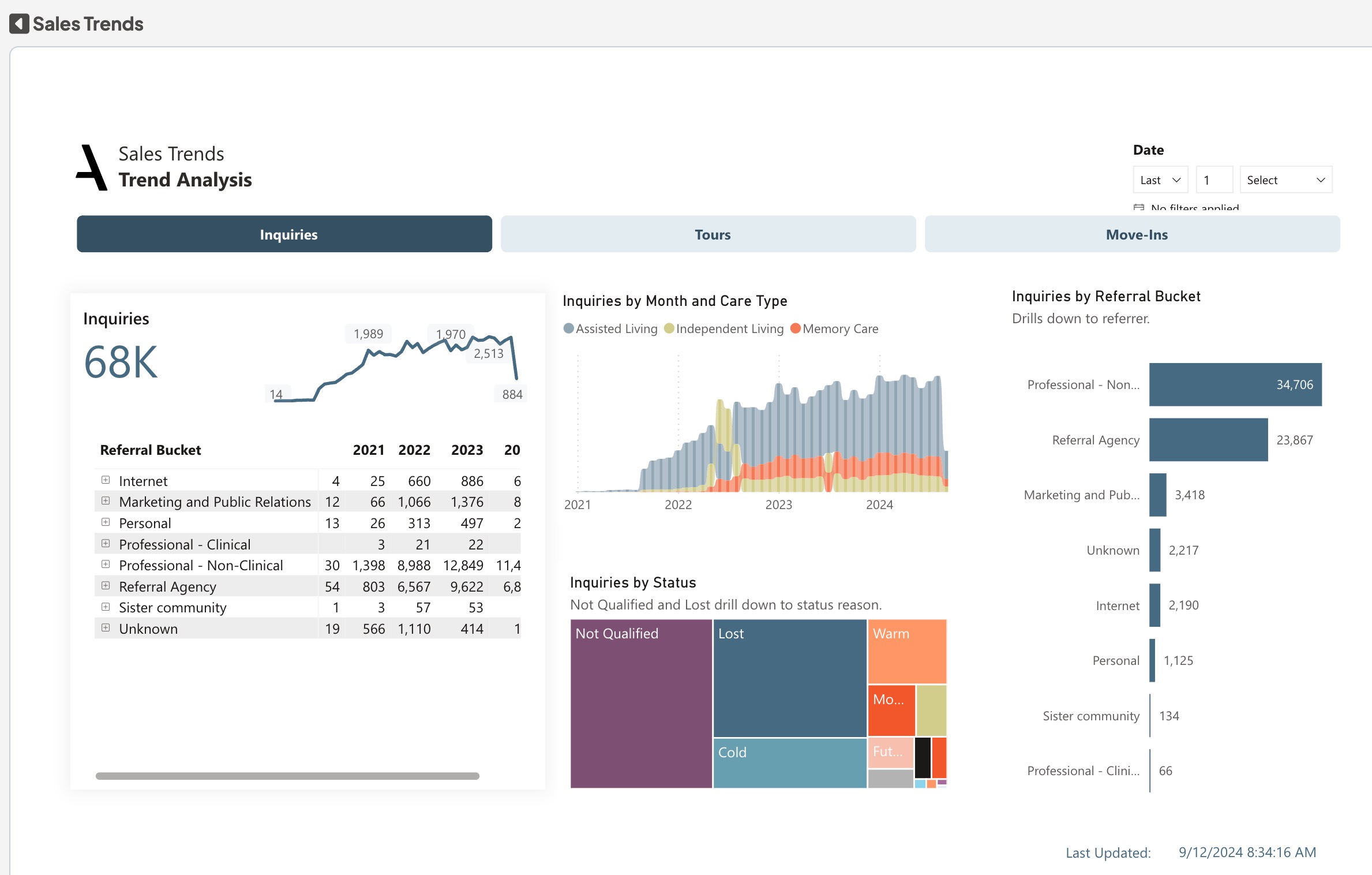
Multi-Faceted Analysis: Examine how different variables such as Referral Bucket and Referral Category impact Inquiries,Tours and Move-Ins. This enables better fine-tuning of your partnerships and marketing efforts.
Inquiry Volume: Gauge the volume attributed to different care types, providing you the information needed to optimize your services and offerings. By Status Tree map Chart: Identify areas that may require immediate attention by examining the status of the metrics you've chosen to focus on.
Dimensions:
Drill down dimensions from year to Quarter to Month to day
Trend Analysis metrics and their definitions:
Inquiries: Total Number of Inquiries
Tours: Total Number of Tours
Move-Ins: Total Number of Move Ins
Not Qualified Report
The Not Qualified Sheet delivers insights into the factors affecting Not Qualified leads, spotlighting trends, service preferences, and referral sources.
Data can also be exported, filtered, and drilled down.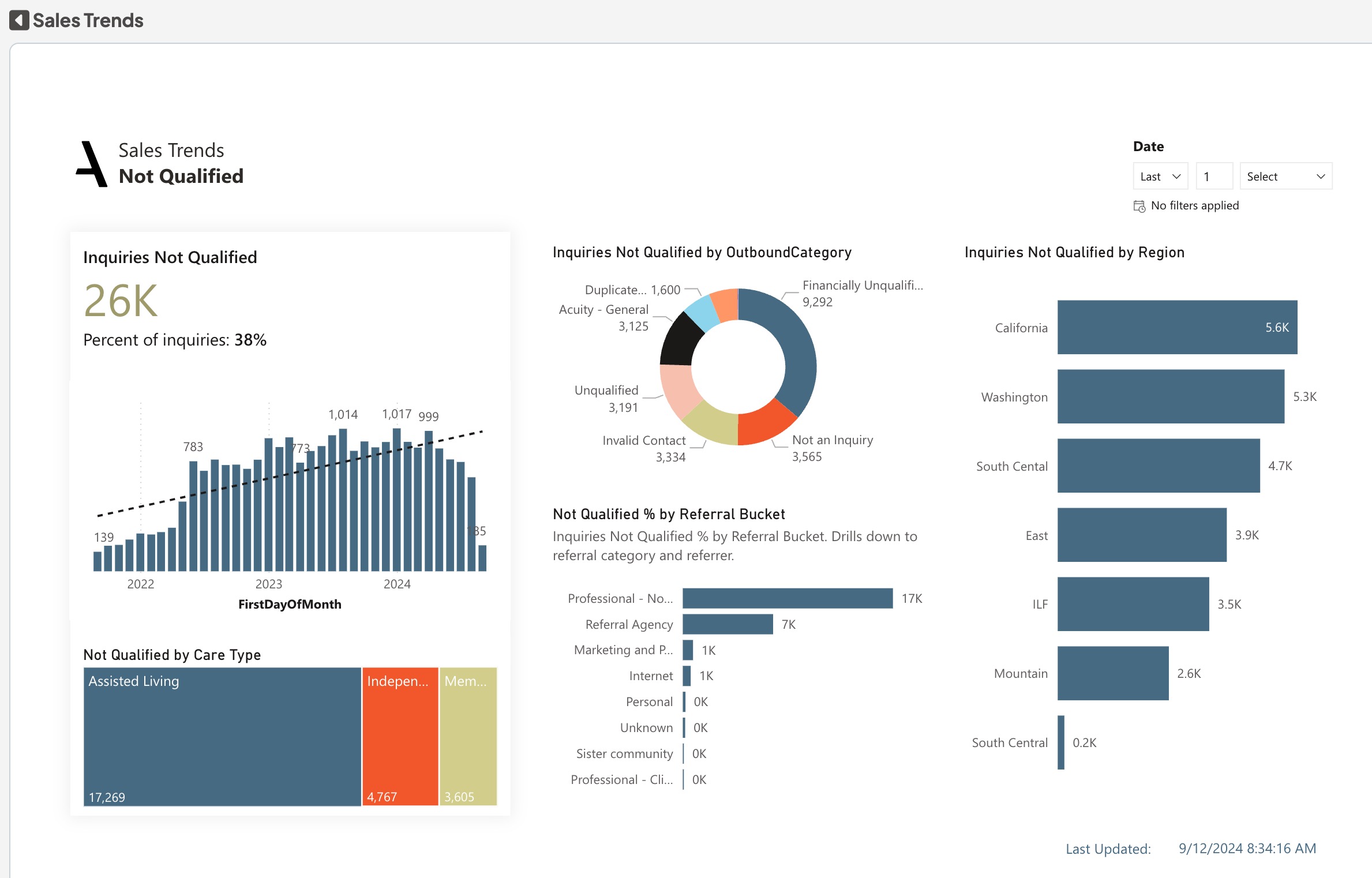
Analyze Monthly Trends: Examine the monthly percentages of leads that are Not Qualified, to identify patterns or shifts that may require attention. Care Type Desires: Explore how specific service desires and Not Qualified categories impact the volume of leads that are Not Qualified, informing potential adjustments to your pricing or marketing strategies. Identify Lead Sources: Use the bar chart to identify which referral agencies and Region are contributing a higher volume of Not Qualified leads.
Dimensions:
Drill-down Dimensions from Region to Community
Not Qualified metrics and their definitions:
Inquiries not qualified: The total number of inquiries not qualified or unable to qualify
Lost to Competitor Report
The Lost to Competitor sheet provides a detailed analysis of inquiries lost to competitors, shedding light on trends and key influencing factors.
Data can also be exported, filtered, and drilled down.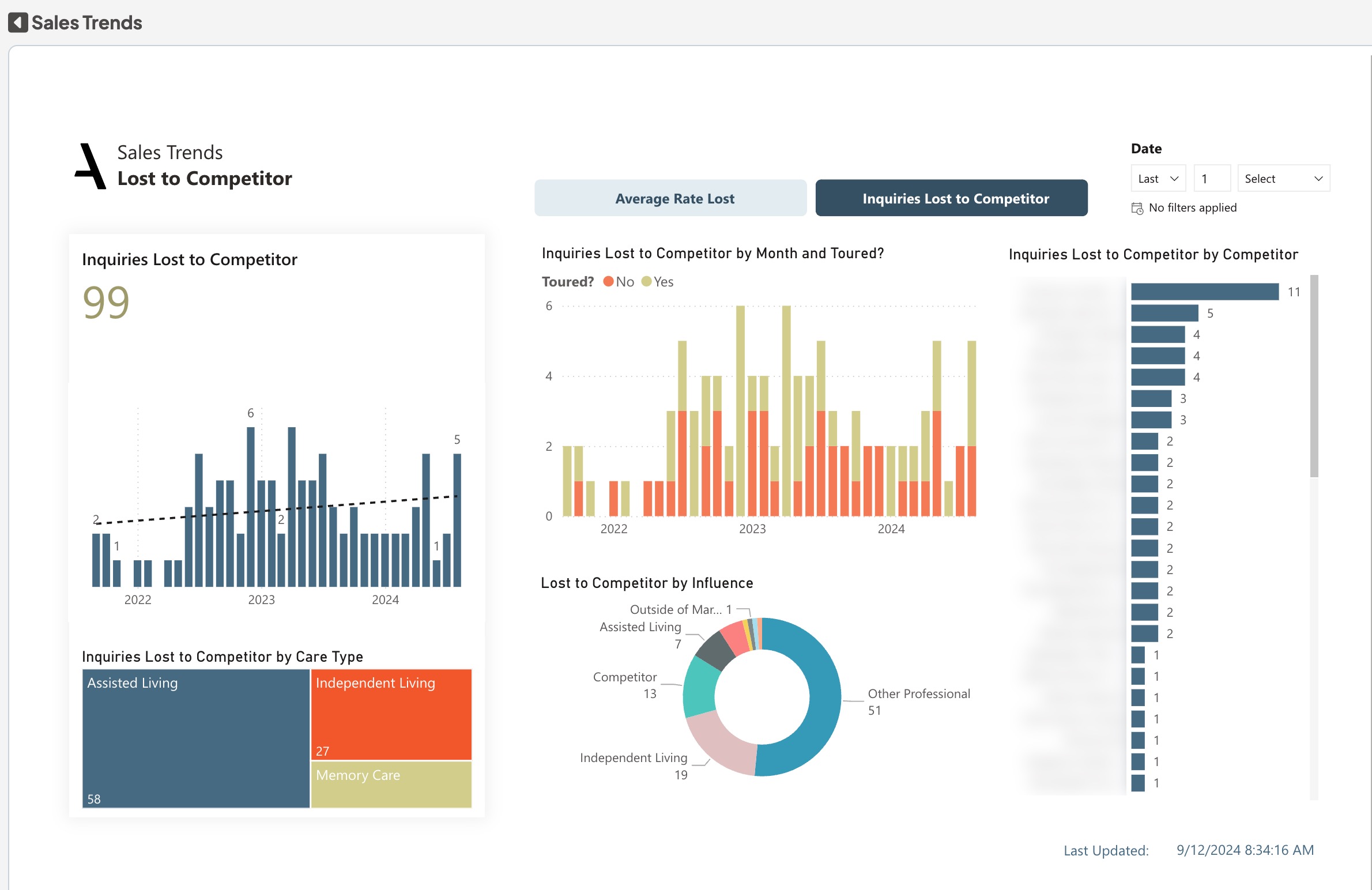
Trend Analysis: Examine monthly lost inquiries, focusing on both toured and non-toured categories to measure the effectiveness of your tours and understand your standing in the competitive arena. Decision Factors: The "What Influenced their Decision" chart, along with the "By Competitor" chart, helps identify the crucial factors contributing to the loss of leads. For example, if "Competitor Rates" emerge as a frequent reason, it may warrant a reevaluation of your own rates.
Service Impact: Discover which services are predominantly lost to competition via the "# Lost to Competitor by Care Type" chart. Competitor Leaderboard: Keep track of which competitors frequently secure inquiries that you lose.Average Rate Lost: Monitor the bar chart that displays the average rate lost by month, providing another dimension to your competitive analysis. Buttons in the top used to navigate the view to Average Rate Lost and Inquiries Lost to Competitor.
Lost to Competitor metrics and their definitions:
Lost to Competitor: The number of Inquiries Lost to Competitor
Details Report
The individual activity records for the first four pages are found here. This page has details for the last three years.
Data can also be exported, filtered, and drilled down.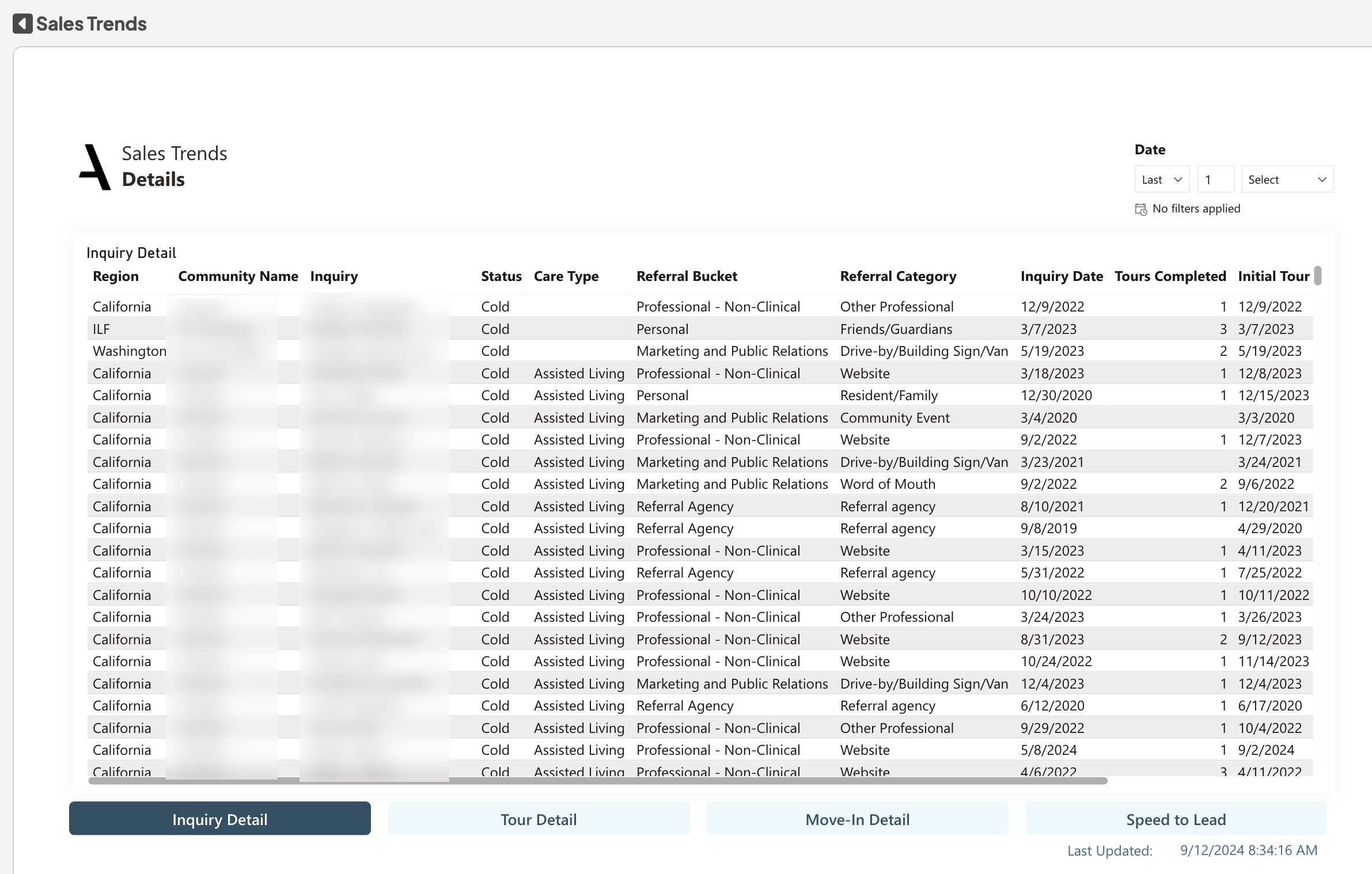
The individual activity records for the first four pages are found here. This page has details for the last three years. To present the relevant details, navigation buttons are available for Inquiry Detail, Tour Detail, Move-In Detail, and Speed to Lead.
Was this article helpful?
That’s Great!
Thank you for your feedback
Sorry! We couldn't be helpful
Thank you for your feedback
Feedback sent
We appreciate your effort and will try to fix the article