Overview
The Rate Increase dashboard empowers progress tracking and goal attainment. It enables you to monitor rate increases, percentage to target, and variance, facilitating efficient management across multiple communities.
Note: the reports are all on a standardized refresh schedule. Check the Last Refresh date to know when the report was last updated.
Rate Increase Leaderboard
Keep track of progress towards goals, identify communities with significant variances, and gain an overview of increases by status.
Data can also be exported, filtered, and drilled down.
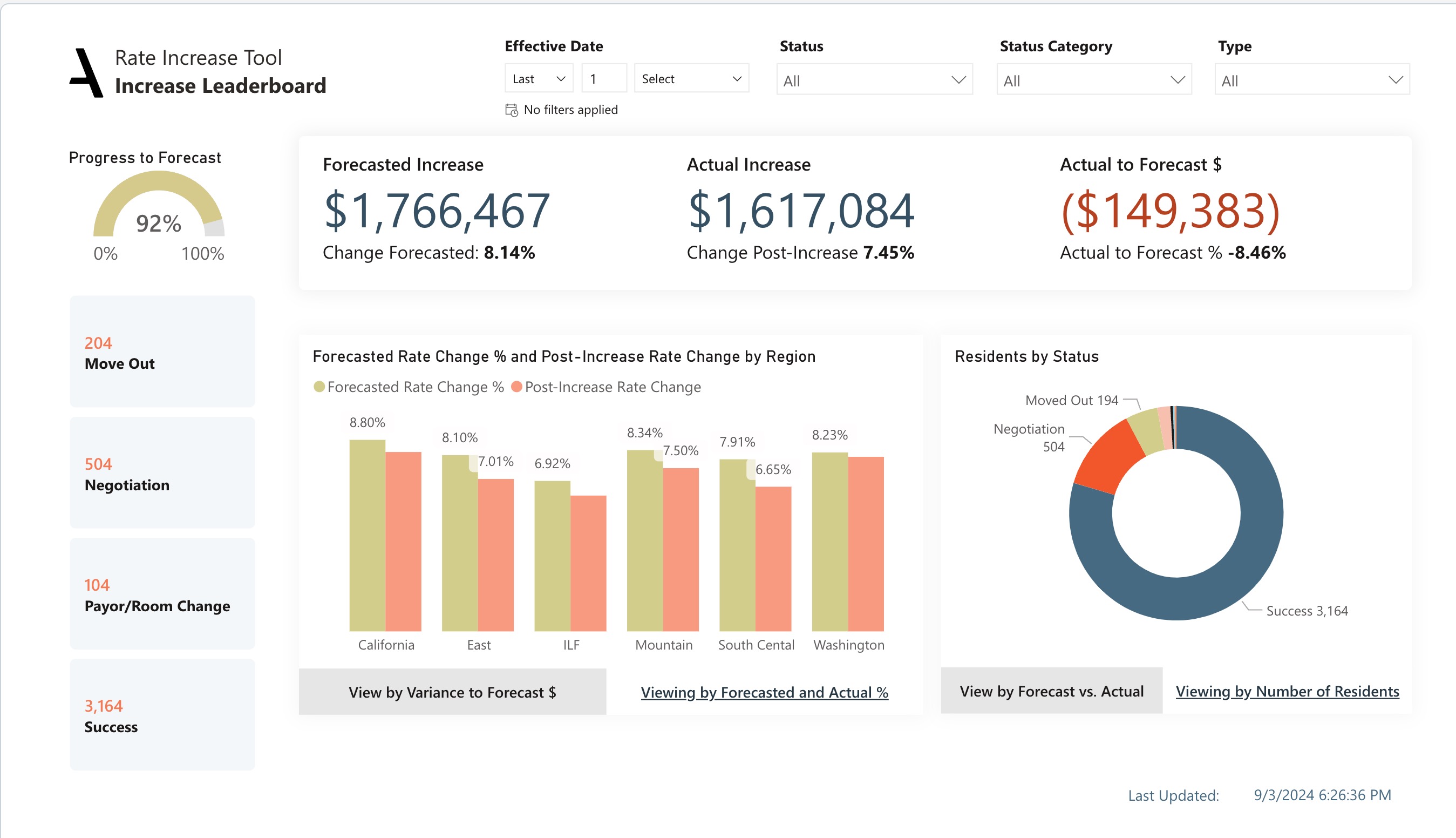
Understand the state of rate increase progress through critical KPls, such as the variance between forecasted and actual increases, offering a clear picture of financial expectations versus reality. Understand the increase/decrease progress through KPls, such as the Move Out, Negotiation, Payor/Room Change and Success.
The filter buttons on the left-hand side enable focus on specific statuses to track rate increases and their effects onrevenue as well as the the number of residents. Observe community-specific progress towards the forecast, providing an at-a-glance comparison of forecasted and actual increase percentages across communities and region.
The buttons along the bottom allow you to toggle the chart measure between the viewing by variance to forecast and view by forecasted and actual and the monetary difference.The buttons along the bottom allow you to toggle the chart measure between the forecast vs actual and viewing by number of residents.Viewing by number of residents button will show a pie chart to explains the no. of residents by status. Using the topmost filter pane, you can filter by rate increase month, type, status, and status category, in addition to the standard Insights filter options.
Dimensions:
- Drill-down Dimensions from Region to Community
Rate Increase Leaderboard metrics and their definitions:
Forecasted Increase: The difference between the forecasted rate and the pre-increase rate. The pre-increase rate represents the rate as of the notification date, while the forecasted rate reflects the rate loaded for the increase in RMS.
%Change Forecasted: The percentage change in rates based on the forecasted rate compared to the pre-increase rate. It indicates the relative rate difference after the increase, providing insights into the expected changes in pricing.
Actual Increase: The difference between the rate before and after the increase, excluding move outs and scheduled move outs.
% Change Post-Increase: The percentage change in rates resulting from a rate increase, It compares the difference between the rate after a rate increase and the rate before the increase, presented as a percentage of the pre-increase rate. It helps to put the rate increase into perspective by showing how much the new rate differs from the original rate.
Actual to forecast: The monetary difference between the forecasted increase and the actual increase in rates. It indicates the variance in dollar amounts between the expected and realized financial impacts of the rate increase.
Progress to forecast: The percentage of the forecasted increase that has been achieved.
Residents by Status: The total number of residents who have experienced a rate increase.
Resident Level Detail
Understand the implications of rate increases on individual residents.
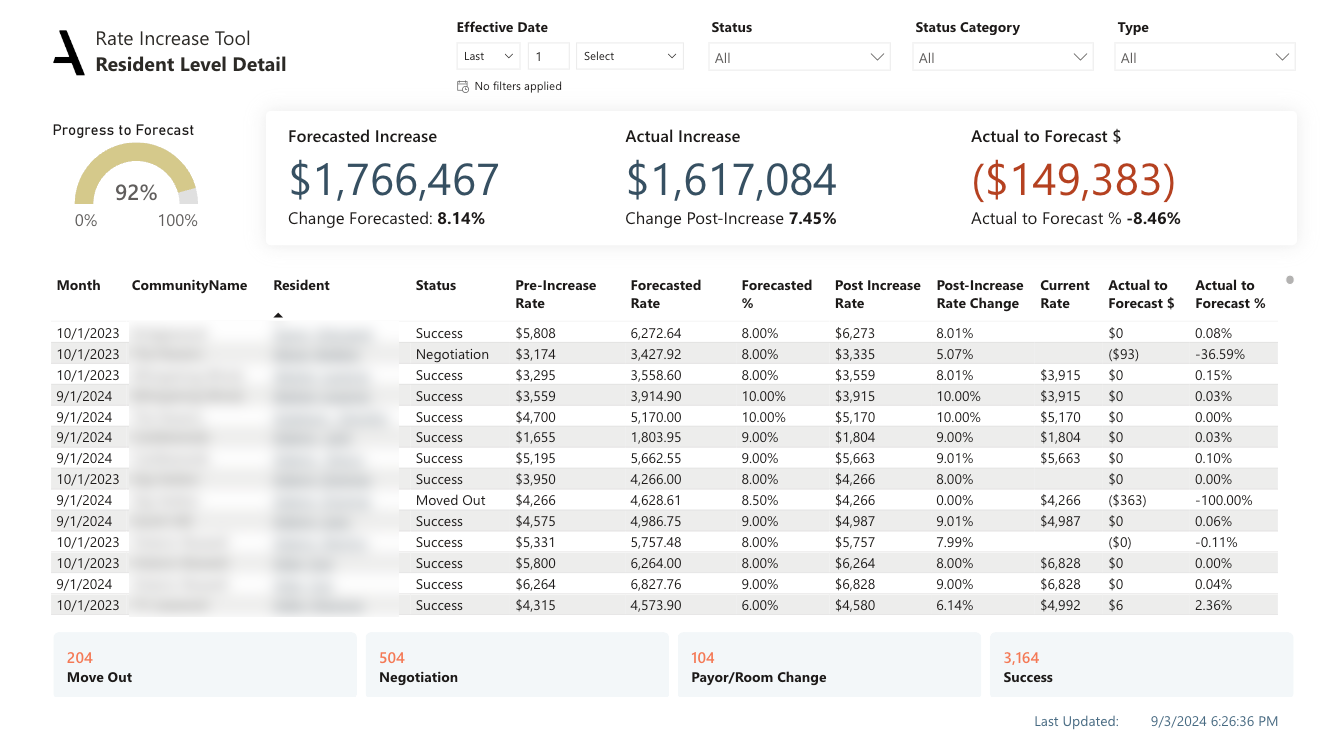
- Compare pre-increase rates and forecasted rates to anticipated changes in pricing.
- Track actual post-increase rates and their percentage change to measure the real impact of rate increases.
- Use current rates and variances to forecast to evaluate the accuracy of predictions and the financial impacts of the rate increase.
Resident Level Details metrics and their definitions:
Pre-Increase Rate: The rate as of the notification date for the rate increase, The notification date can vary by community and is configured in the Revenue management Systems (RMS).
Forecasted Rate: The projected increase rate, based on the RMS configuration, It represents the expected rate for residents after rate increase.
Post-Increase Rate: The actual rate for past occurrences or the expected rate for future occurrences as of the rate increase date. The expected rate is determined based on the resident and date configuration in RMS.
% Change Post-Increase: The percentage change in rates resulting from a rate increase, It compares the difference between the rate after a rate increase and the rate before the increase, presented as a percentage of the pre-increase rate. It helps to put the rate increase into perspective by showing how much the new rate differs from the original rate.
Current Rate: The rate the resident is currently paying or in the case of moved out residents, the rate prior to moving out.
Actual to forecast: The monetary difference between the forecasted increase and the actual increase in rates. It indicates the variance in dollar amounts between the expected and realized financial impacts of the rate increase.
Actual to forecast%: The percentage variance between the forecasted increase and the actual increase in rates.
Rate Increase Outlook
The Rate Increase Outlook sheet presents an organized view of key rate change metrics at the community level.

Filters: Filters applied for Report level. Click the filter pane to expand it and see more filter options.
Slicers: Status, Status Category and Type were introduced to the Slicer Visual to filter the necessary.
Effective Date Filter: Day, week, month, and year values can be filtered for the Present, Past, and Future dates.
Obtain a bird's-eye view of rate changes before and after increases across all communities, along with variances to
forecasted figures.
Understand the targeted and actual percent changes in rates for each community.
Pinpoint areas that require closer scrutiny or targeted intervention.
Evaluate the precision of your forecasting model by comparing the variance between targeted and actual rate changes.
Rate Increase Outlook metrics and their definitions:
Pre-Increase Rate: The rate as of the notification date for the rate increase, The notification date can vary by community and is configured in the Revenue management Systems (RMS).
Target Rate: Loaded Rate less variance allowed as configured in RMS.
Target Rate Change%: The percentage difference between the Target Rate, which is the desired rate allowing for minimal variance, and the rate at the time of rate increase notification, Think of it as your growth goal in terms of rates.
Post-Increase Rate: The actual rate for past occurrences or the expected rate for future occurrences as of the rate increase date. The expected rate is determined based on the resident and date configuration in RMS.
Post-Increase Rate Change: The percentage change in rates resulting from a rate increase, It compares the difference between the rate after a rate increase and the rate before the increase, presented as a percentage of the pre-increase rate. It helps to put the rate increase into perspective by showing how much the new rate differs from the original rate.
Actual to forecast: The monetary difference between the forecasted increase and the actual increase in rates. It indicates the variance in dollar amounts between the expected and realized financial impacts of the rate increase.
Actual to forecast%: The percentage variance between the forecasted increase and the actual increase in rates.
Was this article helpful?
That’s Great!
Thank you for your feedback
Sorry! We couldn't be helpful
Thank you for your feedback
Feedback sent
We appreciate your effort and will try to fix the article