Occupancy Report Overview
A comprehensive view of facility performance, integrating occupancy data, resident movements, and room availability. It enables users to evaluate how well communities meet their occupancy goals, understand the financial impact of resident turnover, and make informed decisions to optimize room management and overall operational efficiency.
All reports are on a standardized refresh schedule. Check Last Refresh date to know when the report was last updated.
Occupancy Overview
- It provides a comprehensive view of resident occupancy across different levels and dimensions.
- It highlights how well communities are meeting their market rate goals by comparing resident occupancy percentages at the region and community levels. The trends over time reveal fluctuations in occupancy and capacity, offering insights into performance and market alignment.
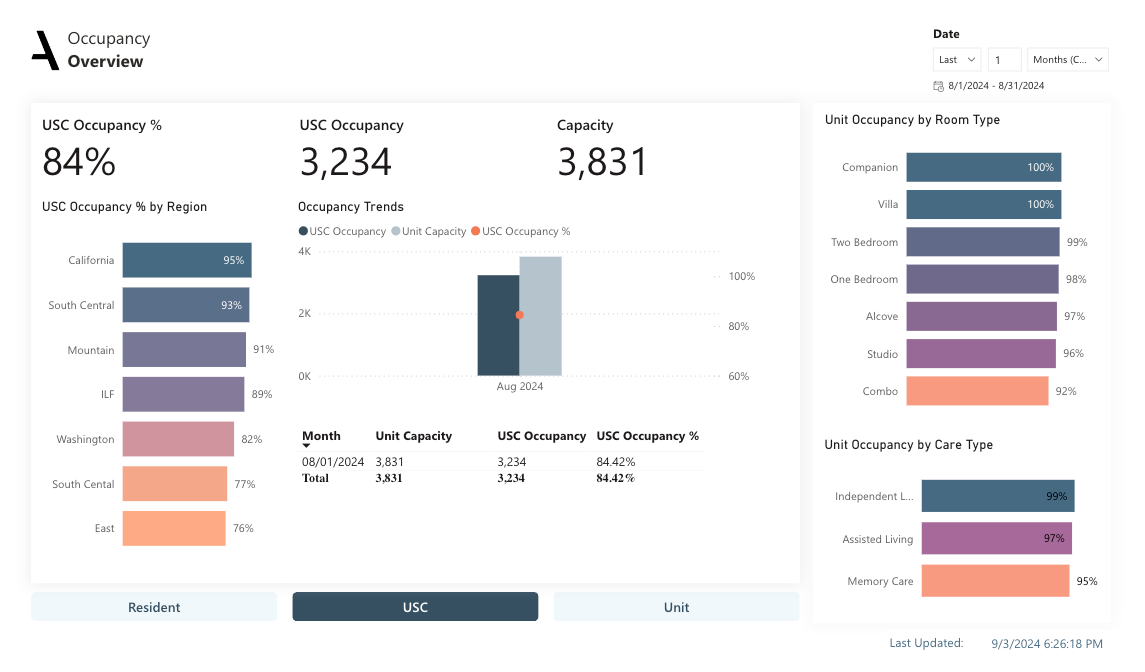
• The KPI's Showing the Overall Resident Occupancy, Percent of Occupancy, Resident Capacity.
• Utilize the bar chart to compare Resident Occupancy % at the region and community level.
• The Occupancy Trends reveals the difference between the Resident Occupancy, Resident Occupancy % and Resident capacity over time. This data gives insights into how well the communities are meeting their market rate goals and the table visual will provide the breakdown on monthly basis.
• The bar chart on the right shows the percent of unit occupancy based on the available room type.
• The bar chart on the right shows the percent of unit occupancy based on the care type.
• The interactive buttons enable users to shift perspectives between Resident, USC, and Unit levels, facilitating targeted analysis and informed decision-making for optimizing resident management and capacity planning.
Dimensions:
Drill-down dimensions from Region to Community.
Occupancy Overview Metrics and their definitions.
• Resident Occupancy: Calculate the number of customers occupying a facility on a specific date.
• Resident Occupancy %: The percentage of occupancy by comparing the number of residents to the total available capacity.
• Resident Capacity: Calculates the total resident capacity for each community, focusing on the most recent month in which a positive capacity is recorded.
• USC Occupancy: The count of customers occupying a facility while adhering to specific business rules regarding exclusions and payor types.
• USC Occupancy %: The percentage of units that are occupied, offering a clear indicator of how well the available capacity is being utilized.
• Unit Occupancy: It provides an accurate count of occupied units, reflecting real-time or end-of-month occupancy.
• Unit Occupancy %: Intended to give a clear and simple metric that represents the proportion of available units that are currently occupied in a community.
• Unit Capacity: The number of units available within a community, focusing on the most recent month where these units are tracked.
• Unit Capacity Count: The total number of Product Inventory ID.
Move-Ins and Move Outs
• Effectively communicates the facility's performance in terms of resident growth and turnover, along with the associated financial implications.
• It shows how new move-ins contribute to revenue, how move-outs affect revenue, and provides a detailed breakdown of sources and reasons for these changes.
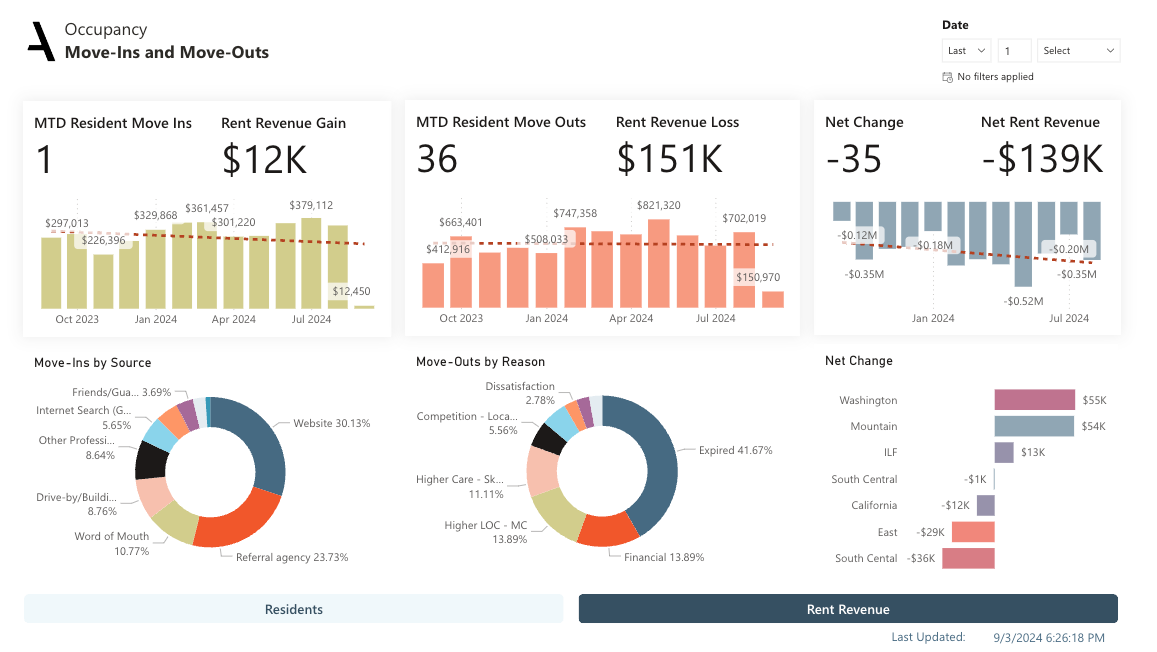
• The Move-Ins Bar chart indicates the expansion of resident numbers (MTD Resident Move-Ins) and the matching increase in rental revenue (Rent Revenue Gain) throughout time period.
• The Move-Out Bar chart indicates the residents who have left (MTD Resident Move-Outs) and the matching rental revenue (Rent Revenue Loss) throughout time period.
• The Net change Bar chart indicates the number of residents and Rental Revenue by comparing the number of new move-ins to the number of move-outs. The Net Rent Revenue gives a summary of how the facility's revenue has been affected by these movements.
• The Donut Chart shows the number of move-ins from each source or referral category
• The Donut Chart depicts the number of move-outs and their reasons.
• The bar chart depicts the net difference in the number of residents by comparing move-ins and move-outs, as well as the overall increase or decline in resident numbers
Dimensions:
Drill-down dimensions from Region to Community.
Move-Ins and Move-Outs Metrics and their definitions.
• MTD Resident Move-Ins: The number of distinct new residents who have moved into a facility for the current month.
• Rent Revenue Gain: The total rental revenue generated from move-ins within the current month.
• MTD Resident Move-outs: To provide a dynamic and accurate count of residents who have moved out of a facility for the current month.
• Rent Revenue Loss: The total rental revenue loss associated with resident move-outs for the current month.
• Net Change: The net difference in the number of residents within a facility by comparing the number of new move-ins to the number of move-outs.
• Net Rent Revenue: The overall change in rental revenue by accounting for both gains from new move-ins and losses from move-outs.
• Move-Ins: The number of Resident Move-Ins, including those with reservations but are not yet moved in.
• Move-Outs: The number of distinct residents who have moved out of a facility within the current month up to but not including the current day.
Available Rooms
• A comprehensive view of room availability, occupancy status, and associated revenue implications.
• The different charts and interactive elements work together to provide a nuanced understanding of the data, supporting strategic decision-making for improving operational efficiency and financial performance.
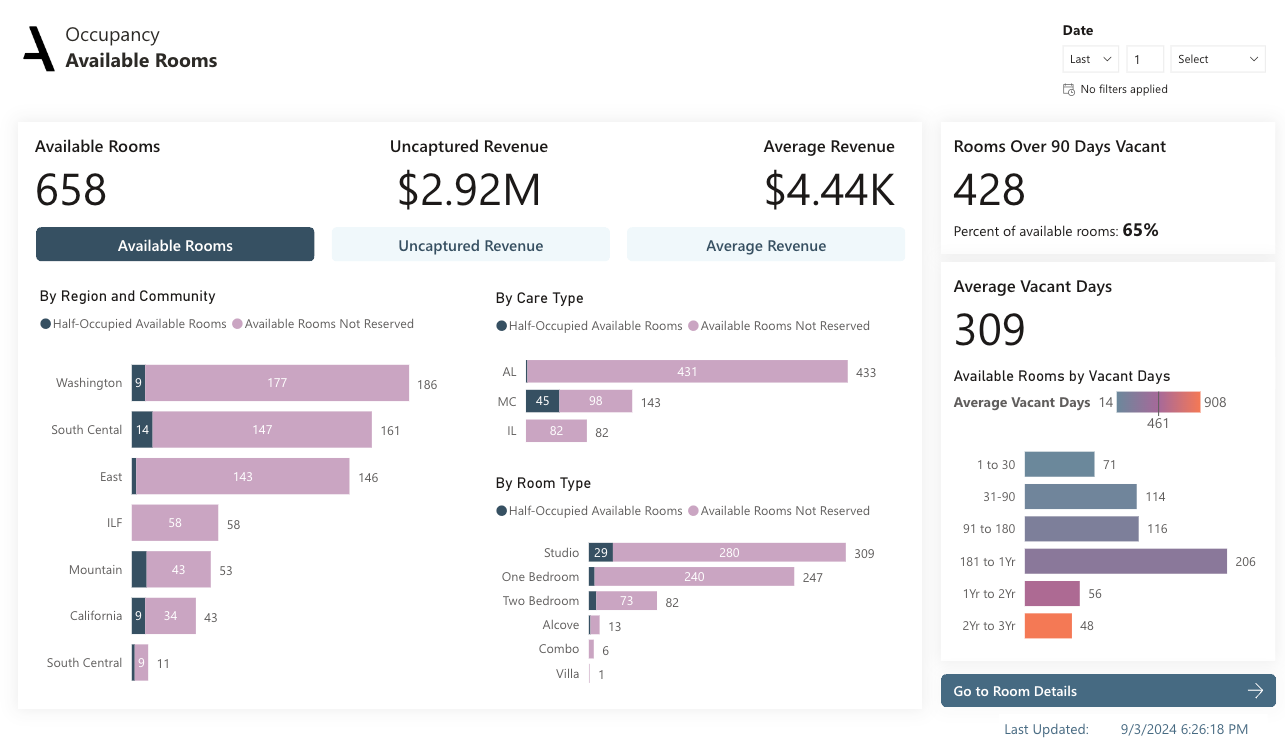
• The KPIs display available rooms, uncaptured revenue, average revenue, and the number of rooms that are vacant for more than 90 days.
• The bar chart shows the classification of Available Rooms, Half occupied available rooms and Not reserved rooms based on the Region and community level.
• The bar chart shows the classification of Available Rooms, Half occupied available rooms and Not reserved rooms based on the Care Type and Room Type.
• The bar chart depicts the average unoccupied days depending on the vacant days category.
• The interactive buttons enable users to shift perspectives between Available Rooms, Uncaptured Revenue and Average Revenue targeted analysis and informed decision-making for optimizing resident management and capacity planning.
Dimensions:
Drill-down dimensions from Region to Community
Available Rooms Metrics and their definitions
• Available Rooms: Gives a clear view of the inventory of rooms that are available for occupancy within a given
community. By counting room identifiers such as Product Inventory ID while excluding any rooms marked as "NotAvailable".
• Uncaptured Revenue: The total revenue that could be generated if all available rooms were fully occupied at their available rates and rooms that are not marked as "Not Available".
• Average Revenue: The total revenue that could be generated from each available room. By dividing the total Uncaptured Revenue by the number of Available Rooms.
• Rooms over 90 days vacant: It indicates the number of rooms that are vacant for more than 90 days.
• Available Rooms Half-Occupied: The number of semi-private rooms that are classified as "Half-Occupied" within a community. this measure focuses on tracking rooms that are not fully utilized.
• Uncaptured Revenue Half-Occupied: The potential revenue that is being lost because certain semi-private rooms are only half-occupied.
• Average Revenue Half-Occupied: The average potential revenue for each semi-private room that is classified as "Half-Occupied." By dividing the total Uncaptured Revenue Half-Occupied by the number of Available Rooms Half-Occupied.
• Half-Occupied Measure: It is a Group of Available Rooms Half-Occupied, Uncaptured Revenue Half-Occupied and Average Revenue Half-Occupied measures.
• Uncaptured Revenue Not Reserved: The potential revenue loss (uncaptured revenue) due to vacant rooms or units that are not reserved within a specific community.
• Available Rooms Not Reserved: The number of rooms or units that are available but not reserved.
• Average Revenue Not Reserved: The average potential revenue per unreserved vacant room or unit by dividing the total uncaptured revenue by the number of available rooms that are not reserved.
• Not Reserved Metric: It is a Group of Uncaptured Revenue Not Reserved, Available Rooms Not Reserved and Average Revenue Not Reserved measures.
• Average Vacant Days: The average number of days that rooms have remained vacant.
• Vacant Days: The number of days rooms are empty is classified.
Room Details
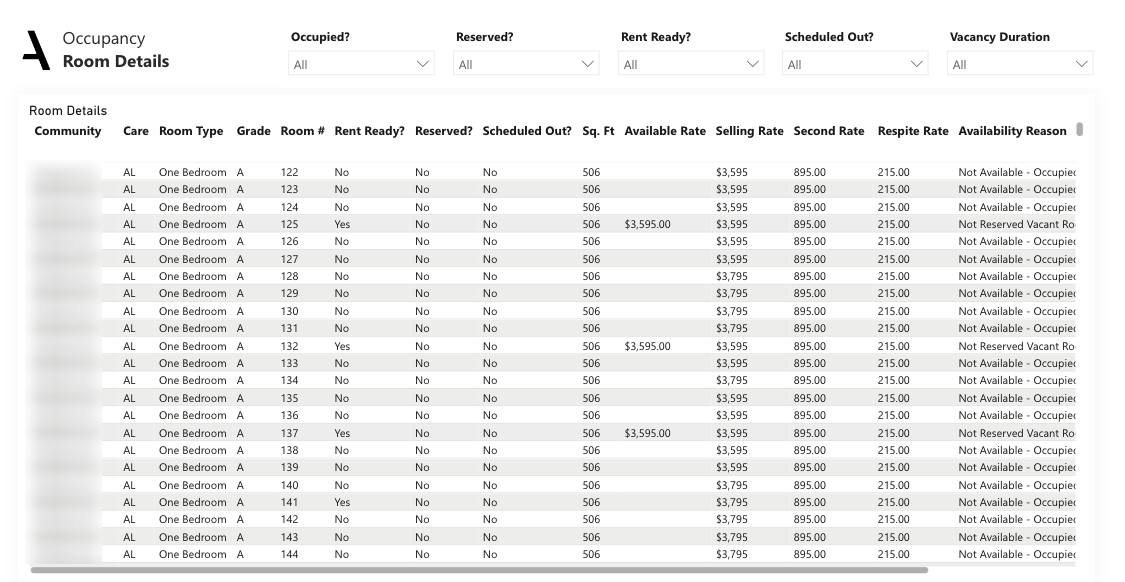
• The Room Details table serves as a critical component for managing and analyzing room availability and pricing. It provides detailed information that supports various analyses.
Filters: Filters applied for the Report level. Click on the filter pane to expand it and see more filter options
Date Filter: Day, Week, Month and Year values can be filtered for the present, past and future dates.
The Room Details table is a comprehensive dataset that provides essential information about each room within the Community and the columns used in the detailed table are Community, Care Type, Room type, Grade, Room Number, Rent Ready or not, Is reserved, are of the room, available rate, selling rate, second rate, respite rate and availability reason.
Was this article helpful?
That’s Great!
Thank you for your feedback
Sorry! We couldn't be helpful
Thank you for your feedback
Feedback sent
We appreciate your effort and will try to fix the article